

AVAYA DOCUMENTATION CENTER
Find answers to your technical questions and learn how to use our products
IP Office J100 Series Phone User Guide
J159 Telephone
The J159 telephone is a SIP telephone supported on systems running Release 11.1 or higher software.
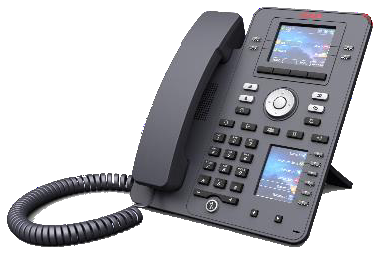
Features include:
Dual displays:
Primary display:
2.8" Color display (320 x 240).
24 programmable button slots (buttons 1 to 24). The button slots can be arranged in single or two column pages (see Single/Dual Column Display).
4 twin-LED (red and green) physical buttons are used to indicate the status of the programmable button slots currently in view on the display.
Secondary display:
2.3" Color display (160 x 240).
24 programmable button slots (buttons 25 to 48). The button slots are arranged in 4-pages of 6.
6 twin-LED (red and green) physical buttons are used to indicate the status of the programmable button slots currently in view on the display.
4 Additional buttons under the primary display. These are used for context-sensitive soft key functions. The buttons current function is indicated by the display label above it. See Call Soft Keys.
Illuminated buttons for
 missed calls/call log,
  speaker,
  headset and
  mute.
mute.Non-illuminated buttons for
 messages,
  contacts,
  phone and
  configuration menu access.
Call alerting/message waiting indication lamp.
Dual 10/100/1000 Mbps Ethernet ports. One for phone network connection. One for PC pass-through to allow co-location with a user PC.
The phone includes a two-position desk stand. An optional wall mounting stand is available.
The J100 Series phones support the following audio codecs on IP Office: G.711, G.726a, G.729, G.729a, G.729ab, G.722.
Power via either PoE (Power over Ethernet). The phone is a PoE Class 1 device. An optional 5V power supply unit is available for locations where PoE is not available or suitable.
Slot for an optional J100 wireless module. The module allows the phone to connect to the network using Wi-Fi and/or to use Bluetooth headsets.
4 Additional buttons under the primary display. These are used for context-sensitive soft key functions. The buttons current function is indicated by the display label above it. See Call Soft Keys.
Illuminated buttons for
missed calls/call log, speaker, headset and mute.Non-illuminated buttons for
messages, contacts, phone and configuration menu access.Additional non-illuminated buttons for
 hold,
hold,  transfer,
  conference and
  redial operations.
Call alerting/message waiting indication lamp.
Dual 10/100/1000 Mbps Ethernet ports. One for phone network connection. One for PC pass-through to allow co-location with a user PC.
The phone includes a two-position desk stand. An optional wall mounting stand is available.
The J100 Series phones support the following audio codecs on IP Office: G.711, G.726a, G.729, G.729a, G.729ab, G.722.
Power via either PoE (Power over Ethernet). The phone is a PoE Class 1 device. An optional 5V power supply unit is available for locations where PoE is not available or suitable.
Slot for an optional J100 wireless module. The module allows the phone to connect to the network using Wi-Fi.
Single USB-A port for USB headset connection and device charging. Use for charging requires the phone to use the optional 5V power supply unit.