

AVAYA DOCUMENTATION CENTER
Find answers to your technical questions and learn how to use our products
IP Office Avaya Workplace Client Installation Notes
Creating an Avaya Workplace Client user
- Using either IP Office Manager or IP Office Web Manager, load the system configuration.
- If using IP Office Manager:
- To edit an existing user, select the existing user record.
- To add a new user , select the system on which the user record should be created and then select
 User.
User.
- If using IP Office Web Manager:
- Select .
- To edit an existing user, click the
 pencil icon next to the user.
 - To add a new user, click +Add User and select the system on which the user record should be created.
- Configure the user settings.
ADDITIONAL INFORMATION:
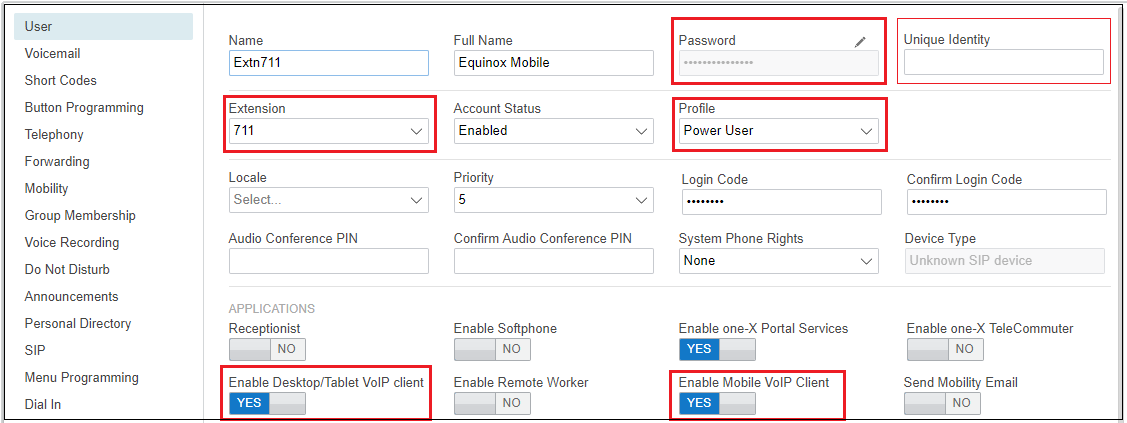 Depending on the license profile selected, the configuration tool may indicate that various other settings must be complete.
 - When creating a new user, after clicking OK or Create, you are prompted whether to also automatically create a new extension.
ADDITIONAL INFORMATION:If Avaya Workplace Client will be the user's only telephony device, select None.