

AVAYA DOCUMENTATION CENTER
Find answers to your technical questions and learn how to use our products
Deploying Avaya Session Border Controller on a Virtualized Environment Platform
Multiple server HA deployment
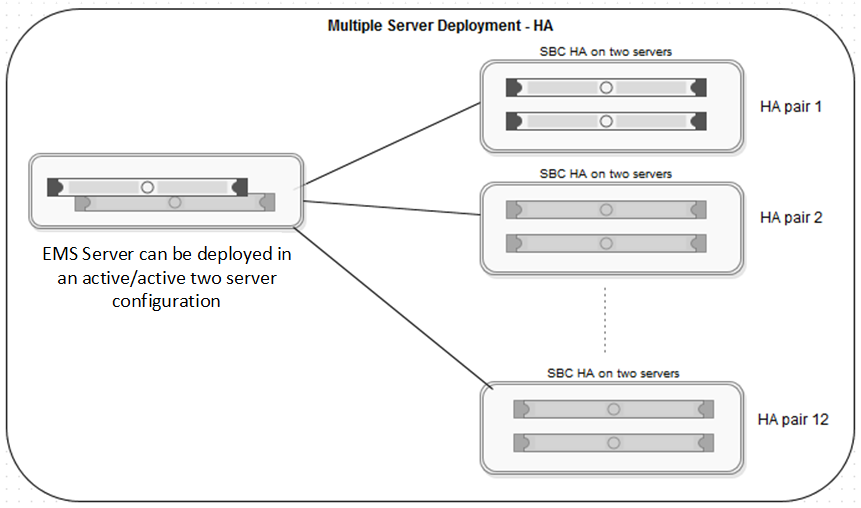
In a multiple server deployment, the EMS and SBC software are installed on separate servers.
In an HA deployment, SBC servers are deployed in pairs. Each pair has one SBC server configured as Primary while the other is configured as Secondary.
Optionally, the EMS software can be replicated in an active/active HA pair deployment. In an active/active deployment, the EMS software is installed on two servers. One EMS server is configured as Primary and the other is configured as Secondary. An EMS HA pair must be reachable to each other and with the SBC servers, and can be in different geographical locations.
One EMS server or an active/active pair of EMS servers can control up to 12 separate pairs of SBC servers.
Note:
When deploying an HA configuration on Amazon Web Services, you only have to configure the SBC software on the primary device
Important:
All hardware server types, virtualized environment platforms, and cloud platforms support the multi-server HA deployment type.
Although the HA pairs and non-HA deployments are shown separately in this figure, EMS can control both an SBC HA server pair as well as a single SBC server.
SBC HA server pairs must adhere to the following requirements:
You can enable and use the HA deployment feature only if the license file contains an HA license.
The HA pair servers must reachable by the EMS or EMS HA pair servers over the Management Plane (M1).
The HA pair servers must be reachable between the devices over the Management link (M1) .
The HA pair servers must have the HA link (M2) reachable between the HA pair servers.
The HA pair servers must set up to have all the data interfaces between the servers replicated so that the servers are connected in same subnets. For example, the A1 data interface in one SBC server should be in the same subnet as the A1 data interface of the paired SBC server. This allows you to meet the requirement that failover be functional in an active/standby mode.
In a multiple server HA virtualized deployment, when there are multiple HA pairs and automatic IP addressing is being used on the HA link (M2), every HA pair should either have their own isolated vSwitch or each HA pair should use different IP addresses reachable with their HA pairs as stated previously for M2 connectivity.
Note:
Note the following recommendations:
Connect the HA pair servers back-to-back using automatic IP addressing.
If the HA pair server M2 links are connected over a network (for example, switches or routers in the same or different locations) and are not in a back-to-back connection, use reachable network IP addresses that have minimum or no latency. You need a good quality connection because HA keep-alive messages and failover messages depend on this link.
High availability requires Gratuitous Address Resolution Protocol (GARP) support on the connected network elements. When the primary Avaya SBC fails over, the secondary Avaya SBC broadcasts a GARP message to announce that the secondary Avaya SBC is now receiving requests. The GARP message announces that a new MAC address is associated with the Avaya SBC IP address. Devices that do not support GARP must be on a different subnet with a GARP-aware router or L3 switch to avoid direct communication. For example, to handle GARP, branch gateways, Medpro, Crossfire, and some PBXs/IVRs must be deployed in a different network from Avaya SBC, with a router or L3 switch. If you do not put the Avaya SBC interfaces on a different subnet, after failover, active calls will have a one-way audio. Devices that do not support GARP continue sending calls to the original primary Avaya SBC.