

AVAYA DOCUMENTATION CENTER
Find answers to your technical questions and learn how to use our products
Deploying Avaya Session Border Controller on ASP 130 R6.0.x (KVM on RHEL 8.10)
Architecture
Avaya SBC deployment on Avaya Solutions Platform 130 Appliance R6.0.x (KVM on RHEL 8.10) uses a virtualized network model. Both the Element Management Server (EMS) and SBC instances run as Virtual Machines (VMs) on the Dell R660xs KVM host, with separate traffic using Linux bridges and VLANs.
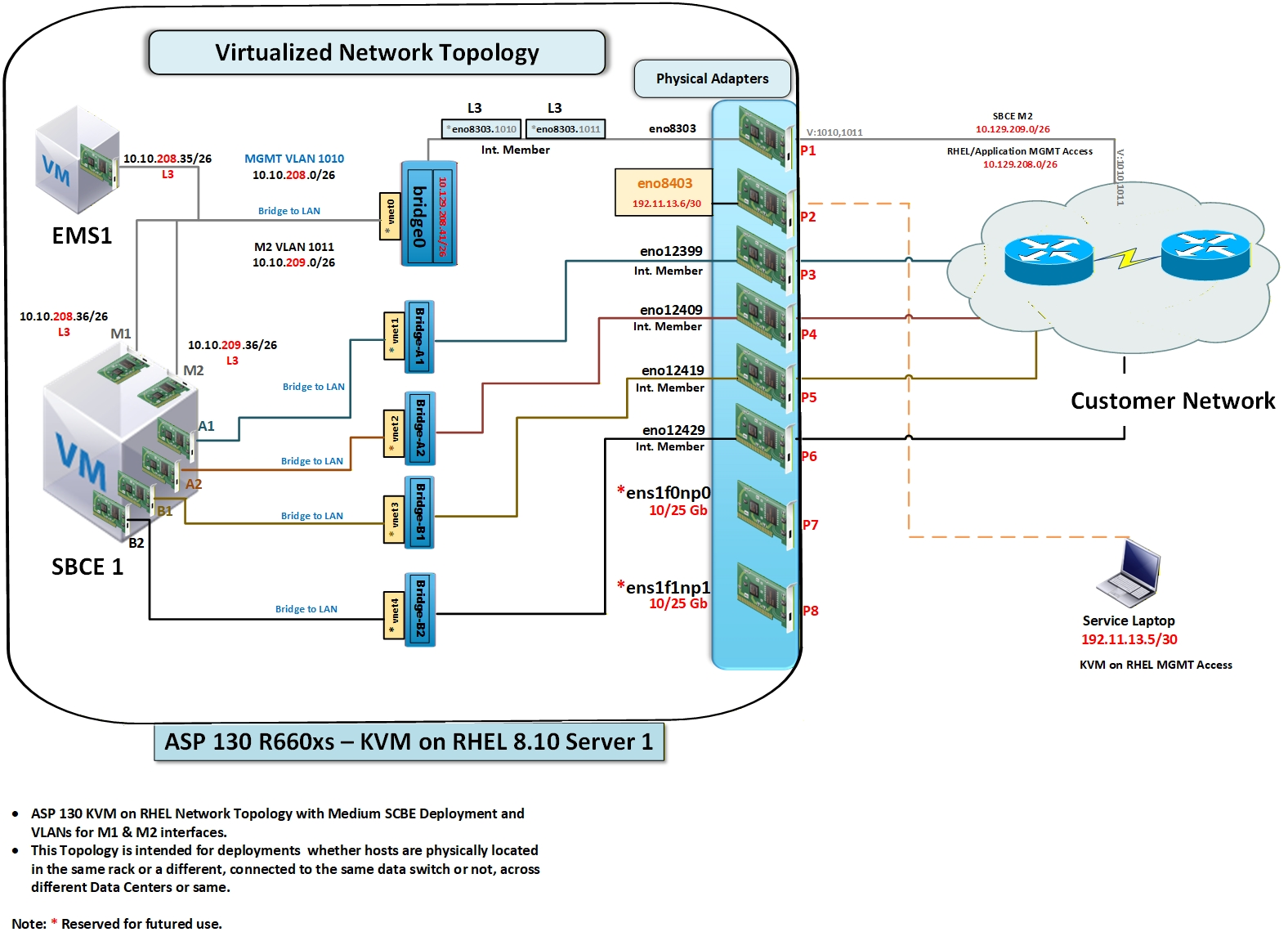
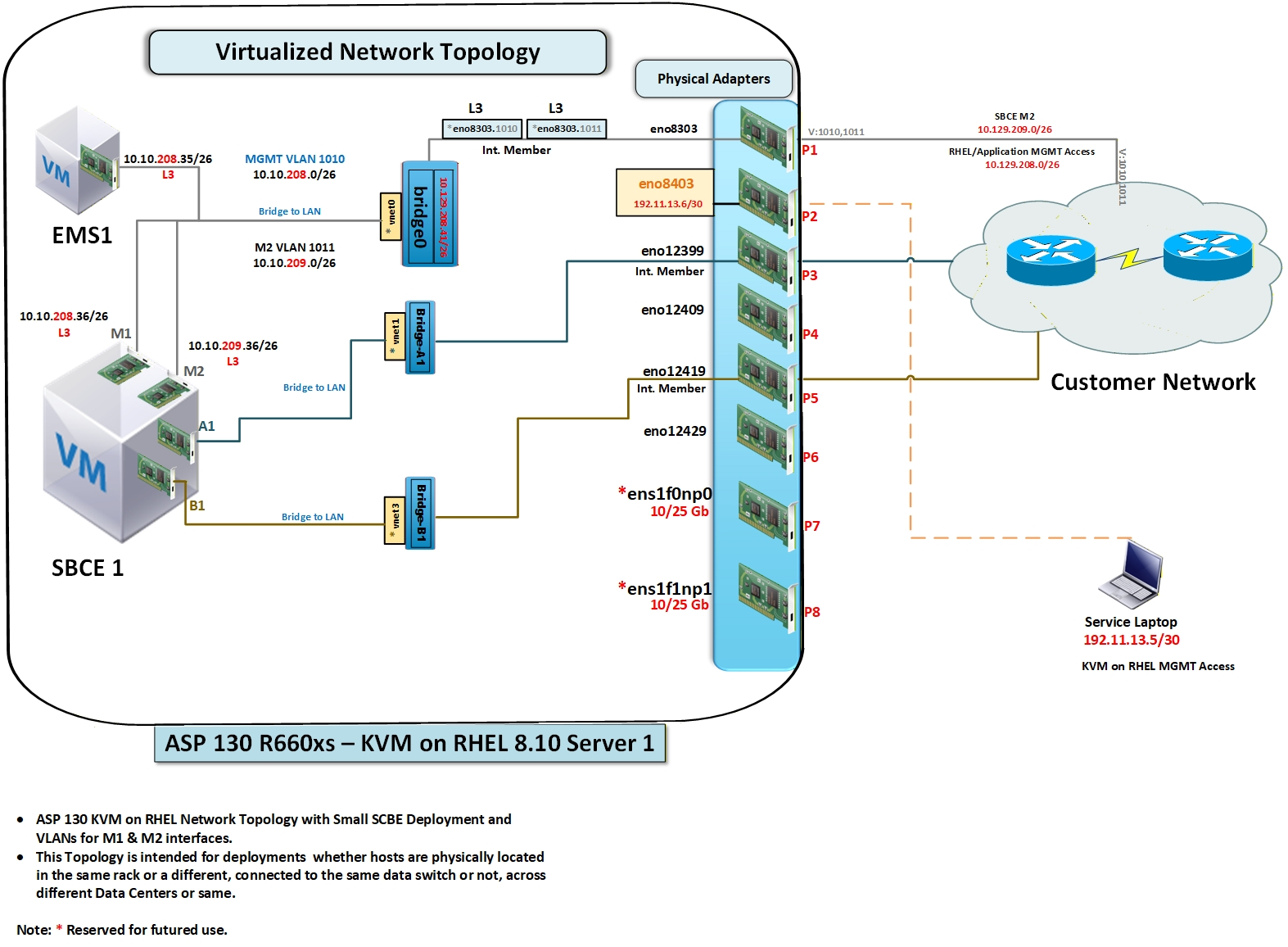
To simplify deployment and eliminate variations, use the following validated architectural rules:
Use VLANs for M1 and M2. This ensures consistent behavior regardless of the host location (same rack, same switch, or different data centers).
Use bridge0 for management access. Use this default Cockpit/libvirt bridge to manage KVM host, manage VMs (M1), access EMS, and manage application networks.
Use 10/25 GbE ports only for high session capacity. Map A2 and B2 to high-speed 10/25 GbE ports only when needed. For small and medium deployments, 1 GbE on A1 and B1 is sufficient.
Note:The 10/25 GbE Network Interface Cards (NICs) are not supported on Avaya Solutions Platform 130 Appliance R6.0.x. Support is planned for the future release.
Any mention of 10/25 GbE NICs in this document refers to the future functionality.
Use of High availability (HA) and direct M2 cable connections is optional. The default option is M2 over a VLAN. Experienced integrators choose an L2 crossover between hosts.
Key design points
Tag M1 and M2 VLANs: Use the Management VLAN for M1 (1010) and the HA VLAN for M2 (1011). For example, refer to Figure 1 and Figure 2.
This approach works for single-rack, multi-rack, or multi-switch scenarios.
Assign Bridges: Use A1 and B1 (1 GbE) for signaling and media. Use A2 and B2 for high-capacity traffic.
Use bridge0: Always use bridge0 as the management base bridge.
Attach NICs to Bridges: Attach all VM NICs to bridges rather than physical NICs to ensure deterministic network performance.
This approach reduces configuration errors and fully aligns with KVM best practices for deterministic network performance.
SBC Capacity and NIC Requirements
SBC deployment size depends solely on session capacity, not the physical layout. The following table lists the recommended NIC usage for each deployment size:
Deployment Size |
Recommended NIC Usage |
|---|---|
Small SBC |
A1/B1 (1 GbE) only |
Medium SBC |
A1/B1 (1 GbE) + A2/B2 (1 GbE)
Note:
10/25 GbE is optional.
|
Large SBC |
A2/B2 (10/25 GbE) required |