

AVAYA DOCUMENTATION CENTER
Find answers to your technical questions and learn how to use our products
Avaya Aura® Communication Manager Survivability Options
Checking the administration on the main server
Procedure
- Type the status ess clusters command, and verify the following:
- The Cluster ID field for the main server is always 1.
- The Active Server ID field is the Server ID that was entered for this server in the Set Server Identities web page during configuration. For duplex servers, the Active Server ID is active for the pair of servers.
- The Registered field is y. If there is n in this column, the survivable core server is not registered and no data will display in the Translation Updated or Software Version columns. It may take several minutes for the survivable core server to register to the main server. For more information about how to troubleshoot the survivable core server registration, see Troubleshooting.
The Translations Updated column:
For Cluster ID 1 (the main server): The Translations Updated column correlates with the time of the last successful save translation command.
For all other Cluster IDs: The Translations Updated column correlates with the date and time of the last successful translation download from the main server.
The Software Version field indicates later versions of Communication Manager.
For an example of the output of the status ess clusters command, see the following figure.
Figure : 1. ESS Cluster information 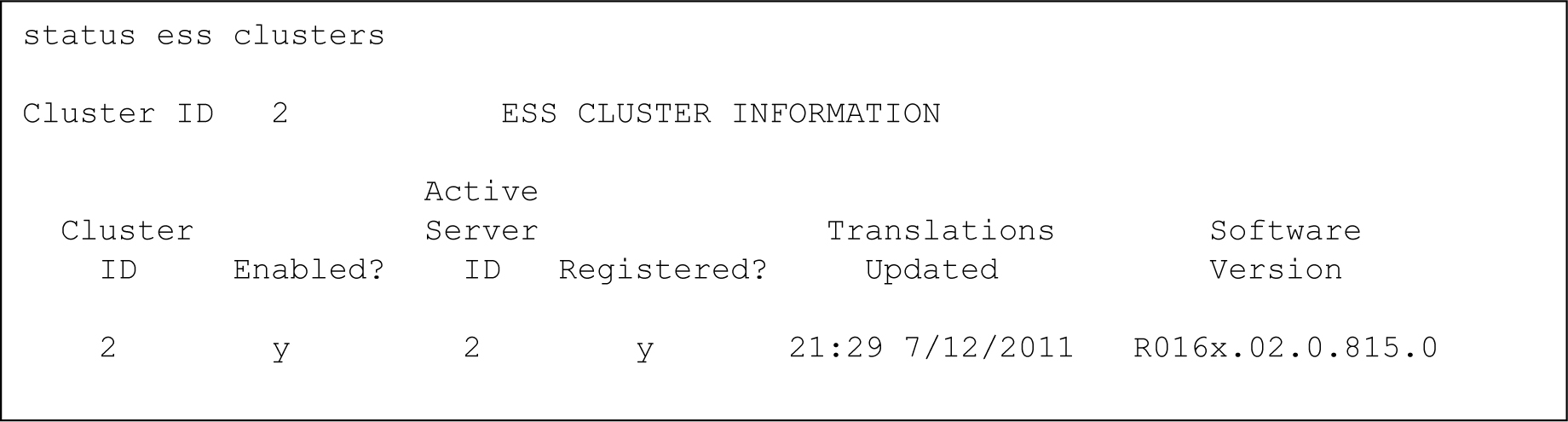 Note:
Note:The survivable core server software version will not appear until the survivable core server registers with the main server for the first time.