

AVAYA DOCUMENTATION CENTER
Find answers to your technical questions and learn how to use our products
Using 1608/1616 Phones on IP Office
Call Icons
These icons are shown to indicate the status of the call on the currently displayed appearance button:
Use the up and down arrow keys to scroll through details of the current call on each appearance button.
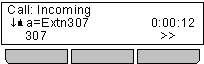
If there is currently a call on the appearance button, an icon will be displayed indicating the status of the call.
Icon
Description
 Alerting
The call is alerting your phone.
 Connected
The call is the currently connected call to which you are talking.
 On Hold
The call is on hold.
 Held Elsewhere
The call has been put on hold by someone else who answered the call using an appearance button on their phone.
 Conference
The call is a conference call.
A >> double-arrow at the bottom left indicates that there are soft key options available that could be applied to the call. To access these, press the >> double-arrow soft key and select the required function.