

AVAYA DOCUMENTATION CENTER
Find answers to your technical questions and learn how to use our products
Installing and Administering the IP Office B179 SIP Conference Phone
Navigating the menus
You can access the menu screen by pressing the MENU button. Use the same button to switch to and from a menu. Your options and actions will vary from menu to menu. The images and the table that follow identify the menu types and their various indicators.
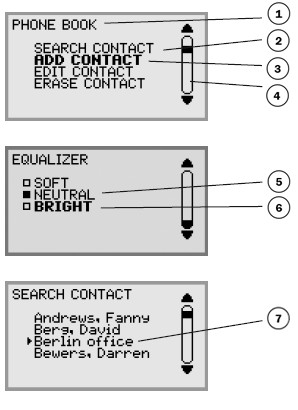
Label |
Description |
|---|---|
1 |
Current menu |
2 |
Submenu |
3 |
Marked option — select by pressing the OK button |
4 |
Scrolling list — indicates the location of the marked option in the menu list |
5 |
Existing settings |
6 |
Marked option — select by pressing the OK button |
7 |
Marked name — select by pressing the OK button |
Navigation and selection in menus
Button |
When pressed |
|---|---|
MENU button |
Open and close the default menu screen. |
C button |
Cancel the setting or return to the previous menu. |
OK button |
Selects the marked option. This button is also used as a confirmation button; after you have made changes to a setting, you must press OK to activate the new setting. |
Arrow buttons |
Navigate to an option in the menu. |
Numerical buttons |
Navigate to a corresponding option in the menu (see the menu trees below). For example, press 2 to open PHONE BOOK and then press 3 to select EDIT CONTACT. |