

AVAYA DOCUMENTATION CENTER
Find answers to your technical questions and learn how to use our products
Installing and Administering the IP Office B179 SIP Conference Phone
IP Office SIP extensions
SIP stands for Session Initiation Protocol and is a standardized protocol (communication regulations) for connecting phone calls via networks – in most cases via the Internet too. To make and receive calls, the phone has to be registered to a SIP switch. The switch can be a company PBX or can be located with an IP telephony service provider. The SIP switch ensures that the call is connected to the right address within the network or sends the call to the public telephone network if the recipient is not registered as an IP telephone in the same switch.
IP Office 5.0 and higher supports the B179 within the IP Office system. In IP Office, the B179 is licensed using an Avaya IP Endpoint license. The number of extensions supported is subject to available licenses and to the normal extension limits of the IP Office control unit being used. This document only covers basic registration with IP Office.
This section of the document provides notes on registering a B179 device with the IP Office system. It assumes that you are familiar with IP Office configuration using IP Office Manager, System Status Application, and System Monitor.
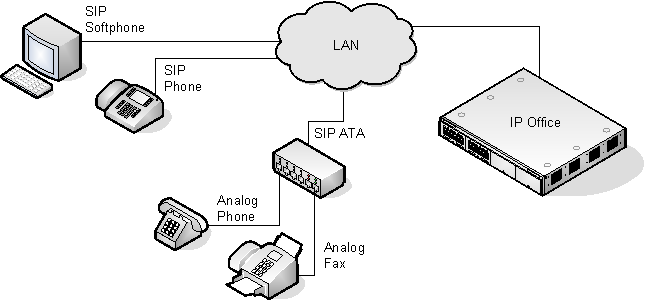

SIP configuration features
No NAT
Connection of B179 devices from locations where Network Address Translation (NAT) is applied to the connection is not supported. The IP Office does not provide NAT traversal services (for example STUN or TURN) for SIP extension devices.
Multiple line SIP devices
If used with an IP Office, each SIP line requires a separate IP Office SIP extension, user, and license. Note that this refers to a SIP device that can handle multiple simultaneous calls itself and not one that is handling multiple calls by holding them on the IP Office or by receiving call waiting indication for waiting calls on the IP Office.
IP Office as the SIP registrar and SIP proxy
In most cases, a SIP extension device is configured with settings for a SIP registrar and a SIP proxy. For SIP devices connecting to an IP Office, the LAN1 or LAN2 IP address on which the SIP registrar is enabled is used for both roles.
Codec selection
Unlike H323 IP devices which always support at least one G711 codec, the B179 does not support a single common audio codec. It is therefore important to ensure that the IP Office SIP extension codecs are configured to match a codec for which the B179 device is configured.
IP Office Call Waiting = SIP 'REFER'
For the IP Office user associated with a B179 extension, Call Waiting should be enabled. This is required for functions such as transferring a call.
Phone features
Beyond basic call handling via the IP Office (see the features listed below), Avaya cannot make any commitments as to which features will or will not work, nor how features are configured on the device.Answer calls
Make calls
Hang up
Hold
Supervised transfer
Unsupervised transfer
Voicemail collect
Set forwarding / DND
Park / Unpark