AVAYA DOCUMENTATION CENTER
Find answers to your technical questions and learn how to use our products
Installing and Administering the IP Office B179 SIP Conference Phone
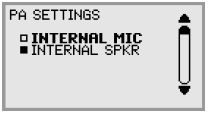
Activating internal microphone and speakers
These settings can only be activated on the B179 device.
Note:
To ensure maximum audio quality, do not use the internal microphone and external microphones connected via the PA box at the same time.
Procedure
- Select MENU > SETTINGS > BASIC > PA (or press 6,1,7 from the main menu).