

AVAYA DOCUMENTATION CENTER
Find answers to your technical questions and learn how to use our products
Installing and Administering the IP Office B179 SIP Conference Phone
Connecting the B179
Connect the Avaya B179 to the network as illustrated below. Plug the Avaya B179 into the mains using the power adapter as illustrated.
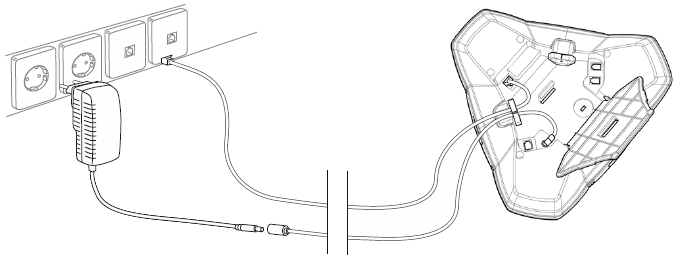
Once the connections are secure, place the conference phone in the middle of the table.

Note:
The Avaya B179 can be driven directly from the network if the network supports Power over Ethernet (PoE).
Registering the B179
The Avaya B179 must obtain a network address and be registered in a SIP PBX before it can be used. The easiest way to register an account and configure the settings in the Avaya B179 is to use a computer connected to the same network and access the integrated web server. Refer to the following section Obtaining a network address for more information.