

AVAYA DOCUMENTATION CENTER
Find answers to your technical questions and learn how to use our products
Installing and Administering the IP Office B179 SIP Conference Phone
Enabling SIP extension support
Once the IP Office system has valid Avaya IP Endpoint licenses, it will allow Avaya SIP IP devices, such as the B179, to be connected.
Note:
Changing the SIP registrar settings of an IP Office system requires the IP Office system to be rebooted.
Procedure
- Select
 System.
 - Select the VoIP sub-tab.
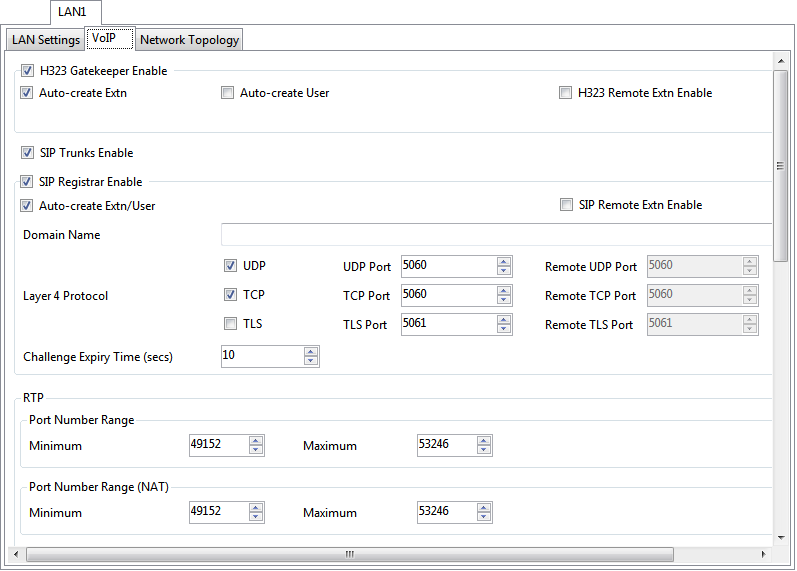
SIP Registrar Enable: Check that SIP Registrar Enable is selected.
Domain Name: Default = Blank
This is the local SIP registrar domain name that will be needed by the B179 in order to register the device with IP Office. If this field is left blank, registration is against the LAN IP address. The examples in this documentation all use registration against the LAN IP address.
Layer 4 Protocol: Default = Both TCP & UDP
The transport protocol for SIP traffic between IP Office and the B179. Both TCP and/or UDP can be used.
TCP Port: Default = 5060
The SIP port if using TCP. The default is 5060.
UDP Port: Default = 5060
The SIP port if using UDP. The default is 5060.
Challenge Expiry Time (sec): Default = 10
The challenge expiry time is used during SIP extension registration. When you register the B179, the IP Office SIP Registrar sends a challenge back to the device and then waits for an appropriate response. If the response is not received within this timeout the registration is failed.
Auto-create Extn/User: Default = On
If this option is selected, the IP Office will automatically create user and SIP extension entries in its configuration based on SIP extension registration. If this method is being used for installation, it is important to check that the settings created match those of the B179. It is also important to deselect this option after installation of the device.