

AVAYA DOCUMENTATION CENTER
Find answers to your technical questions and learn how to use our products
Avaya Session Border Controller Overview and Specification
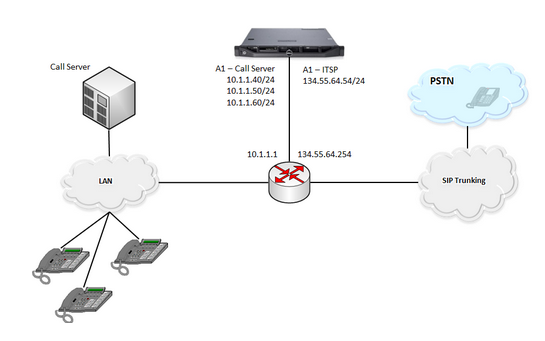
Avaya SBC connected to multiple subnets on a single interface
In this scenario, Avaya SBC connects to multiple subnets on the same data interface.
Configuration details
-
Interfaces and purposes: This configuration uses only the A1 Avaya SBC data interface. With the help of the next-hop router, this data interface provides connectivity to two different networks: the call server network and the ITSP network. This configuration uses three Avaya SBC IP addresses: two for the call server network and one for the ITSP network.
-
Surrounding networking equipment: This configuration uses the next-hop router to support multiple gateway addresses on the same physical network connection.
-
Network interfaces: In this scenario, A1 is enabled. A2, B1, and B2 remain disabled. Enable only one data interface.
-
Networks connected to Avaya SBC: In this configuration, two networks are added to the same Avaya SBC interface. Click the Networks tab in . Define the call server network first and then define the ITSP network. Thus, to configure multiple networks on the same Avaya SBC data interface, add the networks to the same interface when you define the networks.