

AVAYA DOCUMENTATION CENTER
Find answers to your technical questions and learn how to use our products
Avaya Session Border Controller Overview and Specification
Detailed description of Binary Floor Control Protocol
In a conference, some applications control access to a shared set of resources. With BFCP, these applications provide users coordinated access to the resources.
Terminologies
To understand how BFCP works, you must be familiar with the following terms:
-
Floor: A temporary permission to access a specific shared resource or set of resources.
-
Floor chair: A logical entity that manages a floor.
-
Floor control: A mechanism that enables applications or users to gain shared or exclusive access to the resource.
-
Floor control server: A logical entity that maintains the state of the floor, including details such as which floors exist and who holds a floor.
-
Floor participant: A logical entity that requests floors and related information from a floor control server. In floor-controlled conferences, a floor participant might be co-located with a media participant.
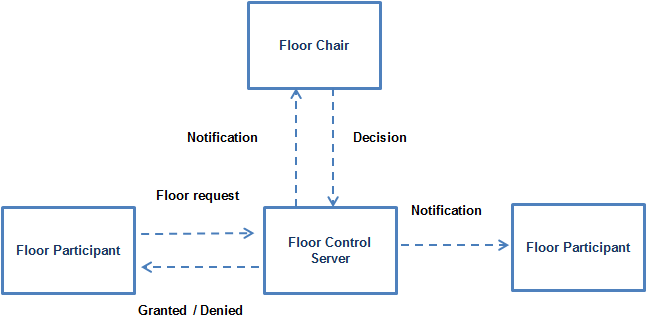
Functioning of BFCP
With BFCP, floor participants can send floor requests to floor control servers and floor control servers can grant or deny access to the requested resource. Also, floor control servers can keep floor participants and floor chairs informed about the status of a given floor or a given floor request.
Avaya SBC relays BFCP control messages to control the presentation channel. Avaya SBC supports BFCP for only two video channels, one of which is a video presentation channel.
In this release, Avaya SBC supports TCP and UDP for the BFCP application.
Avaya SBC negotiates with Avaya Meetings Server MCU or Avaya Meetings Server XT clients and obtains the value of the setup attribute as passive. The far-end then starts the TCP connection for the BFCP application. If Avaya SBC fails to negotiate the setup attribute, the TCP connection is started by Avaya SBC. However, if the connection is not established due to firewall restrictions, the far-end establishes the TCP connection. All the known attributes, such as floor-control, conf-id, user-id, and floor-id are also relayed in SDP.
SDP Offer and Answer exchange rules
Participants and the floor control server use the SDP offer and Answer exchange rules to establish and authenticate the BFCP connection. Avaya SBC does not play any role in connection establishment or reestablishment and authentication.
Avaya SBC negotiates offer and Answer SDP for BFCP based on the following rules:
-
Avaya SBC receives an offer on the incoming leg with the setup attribute as actpass or active. Avaya SBC answers with the setup attribute as passive with a valid port parameter in the BFCP application line.
-
Avaya SBC sends an offer with the setup attribute as passive on the outgoing leg. The far-end entity answers with the setup attribute as active with the discarded port parameter in the BFCP application line.
-
Avaya SBC receives an offer on the incoming leg with the setup attribute as passive.Avaya SBC answers with the setup attribute as active with a valid port parameter in the BFCP application line. Avaya SBC tries to start the TCP connection as indicated by the setup attribute as active. The far-end entity starts the TCP connection on the same connection after time out.
-
Avaya SBC receives an offer with the connection attribute as new. Avaya SBC answers with a connection attribute as new.
-
Avaya SBC receives an offer with the connection attribute as existing. Avaya SBC answers with a connection attribute as existing.
-
Avaya SBC starts an offer on the outgoing leg with the connection attribute as new for all cases.
Avaya SBC relays other BFCP application attributes such as floor-ctrl, label, floorid, confid, and userid. Avaya SBC negotiates these attribute parameters for the end-to-end connection.