

AVAYA DOCUMENTATION CENTER
Find answers to your technical questions and learn how to use our products
Avaya Session Border Controller Overview and Specification
Multiple subnets
With Avaya SBC, customers can connect to multiple subnets from a single interface. Avaya SBC supports multiple IP addresses for each subnet and a unique next hop gateway for each IP address. Therefore, you can have multiple subnets on the same interface. The interface can be a physical or a VLAN interface.
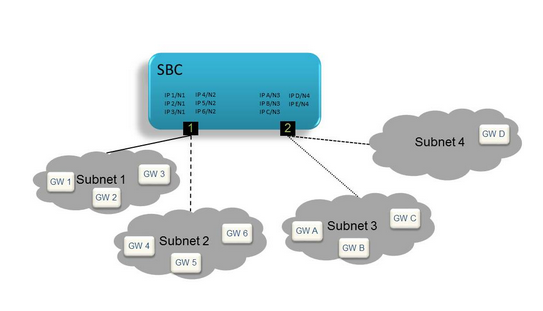
In Connectivity to multiple subnets on a single data interface, subnets 1 and 2 are reachable through interface 1, while subnets 3 and 4 are reachable through interface 2.
Overlapping address spaces
You can use multiple subnets to configure cloud-based deployments and multitenancy. In such configurations, Avaya SBC connects to two or more physically distinct networks that share some or all the IP address space. When you configure overlapped address spaces, multiple endpoints with the same IP address might simultaneously connect toAvaya SBC. However, Avaya SBC can distinguish between the connections. Although multiple endpoints use the same IP address, the networks in which the endpoints reside are physically distinct. Avaya SBC connects to the physically distinct networks by using unique IP addresses in each overlapped address space.
VLAN support
With the virtual LAN (VLAN) capability, a virtual layer-2 network can overlay on a physical layer-2 network by inserting a VLAN tag in the layer-2 header of the packet. Supported network devices can switch such packets through the VLAN overlay. In this release, Avaya SBC supports VLANs only on the data interfaces.
