

AVAYA DOCUMENTATION CENTER
Find answers to your technical questions and learn how to use our products
Using the Avaya Vantage™ Device
Connecting a wireless handset
About this task
Use this procedure to connect or pair a wireless handset with your Avaya Vantage™ device. After pairing a wireless handset with your Avaya Vantage™ device, you cannot use the wired handset. You can pair only one wireless handset with a device at a time.
After you complete this procedure, you can use your wireless handset for calls as long as the handset is turned on. When the handset is turned off, you cannot use it for calls, but it is still paired with Avaya Vantage™.
Before you begin
Log in to your Avaya Vantage™ device.
Connect the handset cradle to your Avaya Vantage™ device.
Charge the handset battery by placing the handset in the cradle.
Ensure that the wireless handset is turned off.
Procedure
- Lift the wireless handset from the cradle, and press and hold the top Power button for at least 10 seconds to enter the pairing mode.
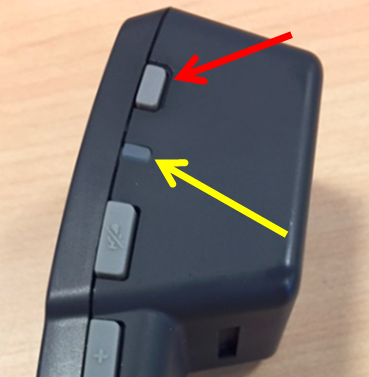
To indicate that the handset is in the pairing mode, the handset LED starts flashing.