

Mounting Avaya Vantage directly on a wall

Last Updated : Jun 08, 2020 |

About this task

You can wall mount Avaya Vantage™ using two screws or a telephone wall plate. This procedure describes how to wall mount Avaya Vantage™ using screws. The device stand has two standard wall-mount slots where you can fit these screws.

Before you begin

Ensure that you have the following items:

  • The two screws included with the device in the box.

  • A rubber wedge included with the device in the box.

  • Phillips-head screwdriver.

  • Pencil.

  • An Ethernet cable.

Procedure

  1. Use a pencil to mark two screw holes that are vertically spaced at 4 inches apart.
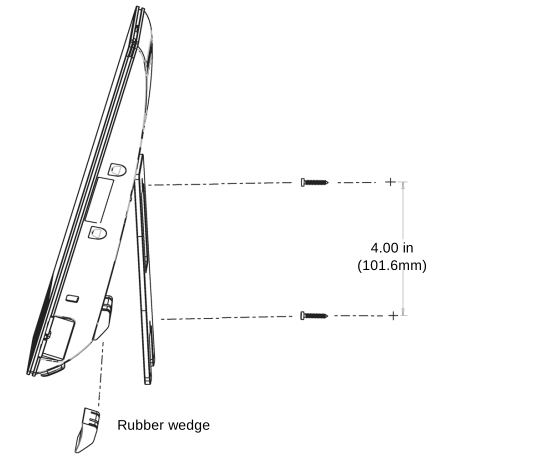

    ISO image of wall mounting using two screws

  2. Drill holes and use a Phillips-head screwdriver to install the screws in the wall.
  3. Attach the rubber wedge to the back of the Avaya Vantage™ device towards the base as shown in the above image.

    The rubber wedge has a self-adhesive area that you can attach to the surface of the device. It stabilizes the wall-mounted device to prevent movement when you touch or tap the screen.

  4. Plug the Ethernet cable to the LAN port on the rear panel of the device.
  5. Optional If you are using an external power supply or an RJ9 headset, connect the power adapter cord or the headset to the device.

    These ports are on the rear panel of the device, which are not accessible when the device is wall mounted. Therefore, carry out this step before you mount the device.

  6. Close the device stand to make it rest on the rubber wedge.
  7. Place any dangling cables through the cable-access openings at the bottom of the stand and around the rubber wedge.
  8. Align the wall-mount slots on the device stand with the screws fitted on the wall and slide the device down until it mounts securely on the screws.