

AVAYA DOCUMENTATION CENTER
Find answers to your technical questions and learn how to use our products
Using the Avaya Vantage™ Device
Mounting Avaya Vantage on a wall plate
About this task
You can wall mount Avaya Vantage™ using two screws or a telephone wall plate. This procedure describes how to mount Avaya Vantage™ on a pre-installed standard dual-stud telephone wall plate.
Before you begin
Ensure that you have the following items:
A rubber wedge included with the device in the box.
A short Ethernet cable, between 4 to 12 inches long, with short RJ45 connectors.
A standard dual-stud telephone wall plate that is installed on the wall.
Procedure
- Attach the rubber wedge to the back of the Avaya Vantage™ device towards the base.
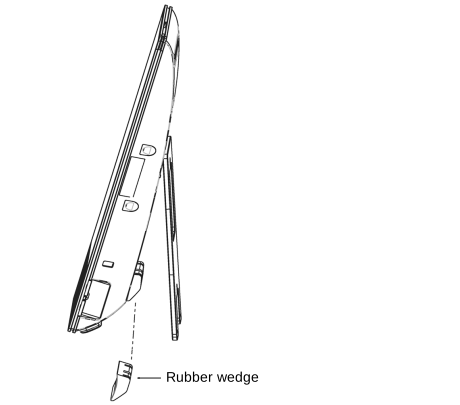
The rubber wedge has a self-adhesive area that you can attach to the surface of the device. It stabilizes the wall-mounted device to prevent movement when you touch or tap the screen.
- Pass the Ethernet cable through the middle gap of the stand and connect the other end to the wall jack.
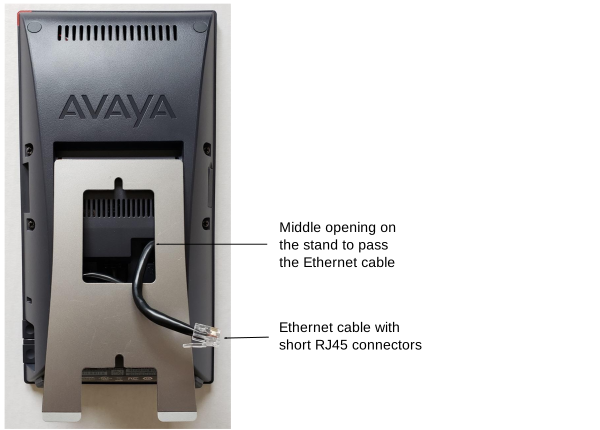
If you use a short cable as suggested, you can fold the extra length of the cable in the space between the stand and the unit.
- Align the slots on the device stand with the wall plate studs and slide the device down until it attaches securely to the wall plate.
