AVAYA DOCUMENTATION CENTER
Find answers to your technical questions and learn how to use our products
Avaya IP Office™ Platform in a Branch Environment Reference Configuration
Topology
The IP Office Branch solution provides the flexibility to support independent, stand-alone IP Office branches as well as IP Office branches connected to an Avaya Aura® system. The Branch solution also supports CS 1000 integration. The following deployment options are available for the solution architecture:
-
Stand-alone IP Office branch option: Independent IP Office systems are deployed within the network. These IP Office systems are not connected to each other or to anything else in the network. With this option, IP Office Branches are not connected to an Avaya Aura® system and users cannot access any Avaya Aura® services.
-
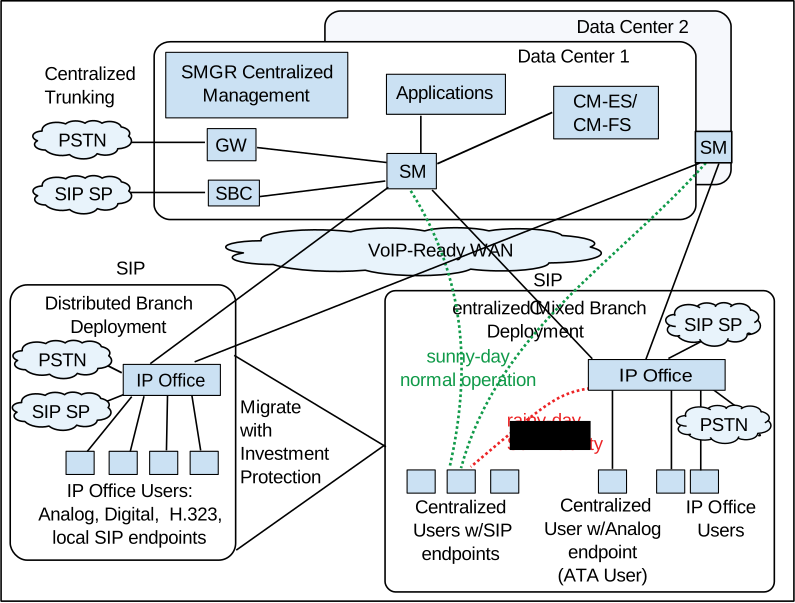
Distributed enterprise branch deployment option: All users in this deployment option are IP Office users. These IP Office users obtain telephony services from the local IP Office and not from Avaya Aura®. The IP Office systems in this deployment option can be connected to Avaya Aura® Session Manager and administrators can obtain Centralized management services through Avaya Aura® System Manager. The enterprise can choose to connect IP Office users in this deployment option to an IP Office voice mail system, Embedded Voicemail or Voicemail Pro, or a Centralized voice mail system, such as Avaya Aura® Messaging or Avaya Modular Messaging. IP Office users in this deployment also have access to some Centralized Avaya Aura® applications and services.With the Distributed branch deployment option, you can also connect CS 1000 to IP Office in the branch through Avaya Aura® Session Manager. Users still obtain telephony services from the local IP Office, but can use Avaya CallPilot® as their voice mail system. When connected to CS 1000, IP Office and CS 1000 interoperate as peers through Avaya Aura® Session Manager.
-
Centralized enterprise branch deployment option: All users in the enterprise are Centralized users.Centralized users register to Avaya Aura® Session Manager and obtain telephony services from the Avaya Aura® Communication Manager Feature Server or Evolution Server in the enterprise core. If WAN connectivity to Avaya Aura® Session Manager is lost, the user automatically gets basic telephony services from the local IP Office. The telephony features provided by IP Office in survivability mode is limited compared to the features that are normally provided to the Centralized phone.Centralized users must be configured on the Avaya Aura® Session Manager, Communication Manager, and IP Office. A Centralized user must be configured on the Avaya Aura® Session Manager and Avaya Aura® Communication Manager as a SIP user. On IP Office, the Centralized user must have either a SIP extension, an analog extension, or an analog fax device.
-
Mixed enterprise branch deployment option: An enterprise branch with both Centralized users and IP Office users. Centralized users and IP Office users obtain the same telephony services described above. All users in this deployment option must use a Centralized voice mail system: Avaya Aura® Messaging or Avaya Modular Messaging.
The deployment options in the Branch solution allow you to start off with stand-alone IP Office systems and then slowly evolve the solution architecture into a Centralized environment as your enterprise grows.
The following image shows the topology of the solution architecture with the deployment options described above. This image does not show CS 1000 in the Distributed branch deployment.