

Sunny Day: Centralized SIP phone to Centralized SIP phone transferred to centralized voice mail

Last Updated : Nov 02, 2015 |
Prolog information
In this scenario, User A calls User B. User B does not answer and the call is transferred to a centralized Avaya Aura® Messaging or Avaya Modular Messaging voice mail system. The following image shows the call media flow for a call from a centralized user to another centralized user with coverage to voice mail.
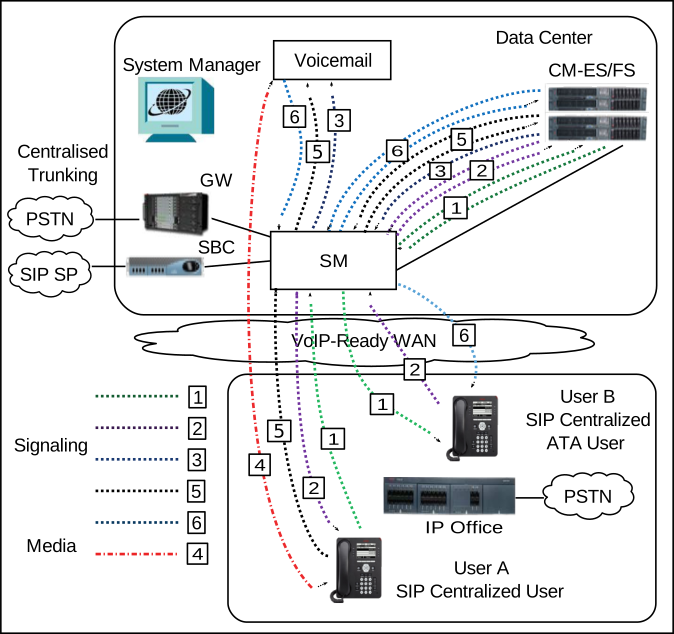
Figure: Centralized user A call to centralized user B with coverage to voice mail
The following table describes the call signaling flow in more detail.
Call signaling flow description for call from a centralized user to another centralized user with coverage to voice mail
Call scenario
Description of call signalling flow
  1. SIP centralized user A dials SIP centralized user B
  2. User at station B does not answer the call.
  3. Call is forwarded to an Avaya Aura® Messaging or Avaya Modular Messaging centralized voice mail system.
  4. User A leaves a voice mail message for user B.
  5. User A hangs up after leaving the message.
  6. Message Waiting Indicator lights up on user B’s phone to indicate that a new voice message is waiting.
  1. User A SIP Invite Session Manager Communication Manager Session Manager user B.
  2. Ringing user B Session Manager Communication Manager Session Manager user A.
  3. A CANCEL message is sent for the original invite and a new invite is sent from Communication Manager Session Manager centralized Avaya Aura® Messaging or Avaya Modular Messaging voice mail system.
  4. RTP media is set up between user A, theCommunication Manager gateway, and the voice mail system.
    After a series of invites, RTP is set up between User A and the voice mail system.
  5. BYE is sent from user A Session Manager Communication Manager Session Manager voice mail.
  6. NOTIFY is sent from voice mail Session Manager Communication Manager PUBLISH to Session Manager NOTIFY user B with Message Waiting Indication status.