

AVAYA DOCUMENTATION CENTER
Find answers to your technical questions and learn how to use our products
Avaya IP Office™ Platform in a Branch Environment Reference Configuration
Rainy day call flows: Incoming call transferred to Avaya Aura® Messaging or Avaya Modular Messaging
When configuring a branch to use Avaya Aura® Messaging or Avaya Modular Messaging, an internal number is set for calls to the Centralized voice mail system to be automatically routed through the SM Line. You can also configure an additional PSTN number to ensure that calls to Avaya Aura® Messaging or Avaya Modular Messaging are correctly routed to the PSTN trunk when the SM Line is not available. For configuration procedures, see Deploying Avaya IP Office™ Platform as an Enterprise Branch with Avaya Aura® Session Manager.
Rainy day media flow scenario
The following image shows the media flow for an unanswered call in Rainy day. In this media flow scenario, the unanswered call is transferred to a Centralized Avaya Aura® Messaging or Avaya Modular Messaging voice mail system.
Important:
This type of call flow scenario in Rainy day is not supported on CS 1000 Call Pilot voice mail systems.
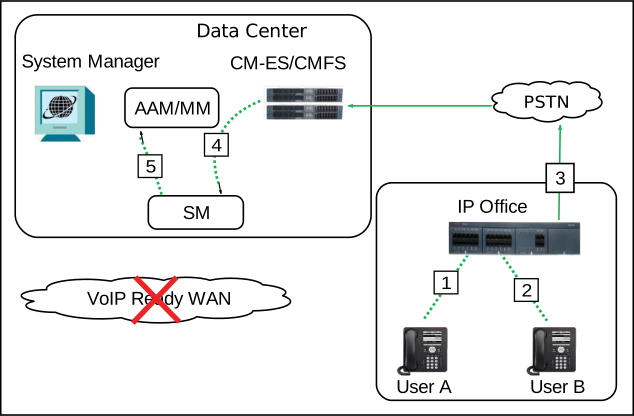
In Rainy day, all station types (SIP, H.323, digital, and analog) are registered to IP Office. IP Office users and Centralized users leave and retrieve voice mails over the PSTN. In Rainy day conditions, DTMF digits indicate specific mailboxes, and the Message Waiting Indicator on the called user’s phone does not light up.
The following table describes the call signalling flow in more detail.
|
Call scenario
|
Description of call signalling flow
|
|---|---|
|
|