

AVAYA DOCUMENTATION CENTER
Find answers to your technical questions and learn how to use our products
Avaya IP Office™ Platform in a Branch Environment Reference Configuration
Sunny day: Centralized phone to Centralized phone within the branch
In this scenario, the Centralized user that receives the call answers the call as expected.
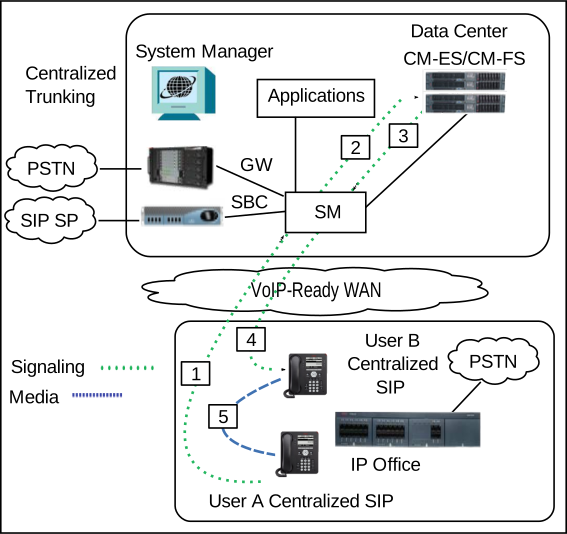
IP Office is not involved in this scenario. For the call signaling flow to work as expected, Avaya Aura® Communication Manager must be configured for Initial IP-IP Direct Media.
The following table shows the call signaling and media flow for this call scenario in more detail.
|
Call scenario
|
Description of call signalling flow
|
|---|---|
|
User A makes a call to user B. The call connects successfully and user B answers the call as expected.
|
The following steps outline the call signaling flow shown in the image above.
|