

Sunny day: Incoming call from centralized SIP phone to H.323 IP Office phone transferred to centralized voice mail

Last Updated : Oct 28, 2015 |
In this scenario, the call is transferred to a centralized Avaya Aura® Messaging or Avaya Modular Messaging voice mail system in Sunny day.
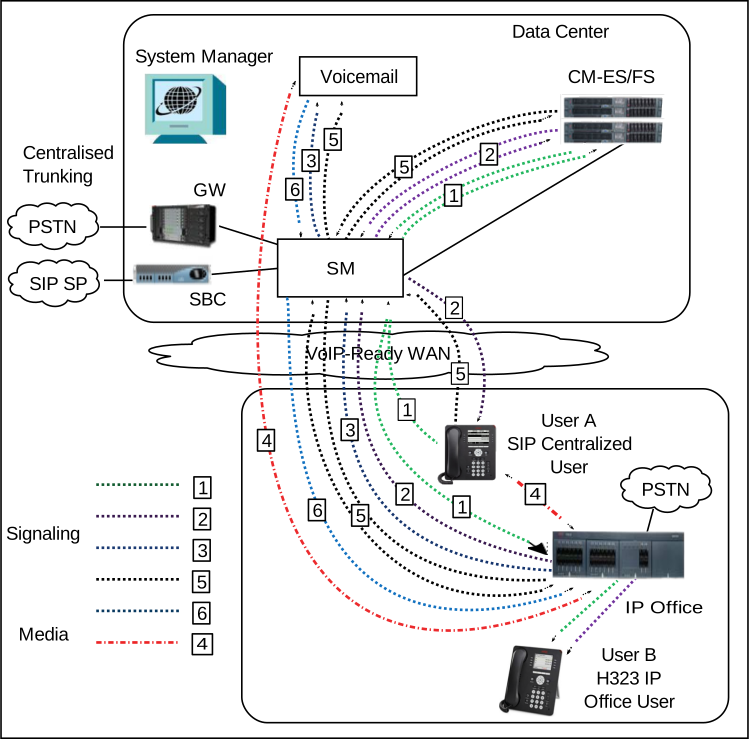
Figure: Call media flow for an incoming call from a centralized SIP phone to an H.323 IP Office phone
The following table describes the call signaling flow in more detail.
Call signaling flow description for incoming call from a centralized SIP phone to an H.323 IP Office phone transferred to centralized voice mail in Sunny day
Call scenario
Description of call signalling flow
  1. SIP Centralized user A calls H.323 IP Office user B.
  2. User B does not answer the call.
  3. Call is forwarded to an Avaya Aura® Messaging or Avaya Modular Messaging centralized voice mail system.
  4. User A leaves a voice mail message for user B.
  5. User A hangs up after leaving the message.
  6. Message Waiting Indicator lights up on user B’s phone to indicate that a new voice message is waiting.
  1. User A SIP Invite Session Manager Communication Manager Session Manager H.323 IP Office user B.
  2. Ringing IP Office phone Session Manager Communication Manager Session Manager user A.
  3. SIP Invite sent from IP Office Session Manager centralized Avaya Aura® Messaging or Avaya Modular Messaging voice mail system.
  4. RTP is set up between user A, IP Office, and the voice mail system.
  5. BYE is sent from user A Session Manager Communication Manager Session Manager IP Office Session Manager voice mail.
  6. NOTIFY is sent from voice mail Session Manager IP Office with Message Waiting Indication for user B.