

AVAYA DOCUMENTATION CENTER
Find answers to your technical questions and learn how to use our products
IP Office Platform H.323 Telephone Installation
Remote H.323 Extensions
For IP Office Release 8.0+, the configuration of remote H.323 extensions is supported without needing those extensions to be running special VPN firmware. This option is intended for use in the following scenario:
The customer LAN has a public IP address which is forwarded to the IP Office system. That address is used as the call server address by the H.323 remote extensions.
The user has a H.323 phone behind a domestic router. It is assumed that the domestic router allows all outbound traffic from the home network to pass through and allows all symmetric traffic. That is, if the phone sends RTP/RTCP to a public IP address and port, it will be able to receive RTP/RTCP from that same IP address and port. Configurations otherwise are not covered by this documentation.
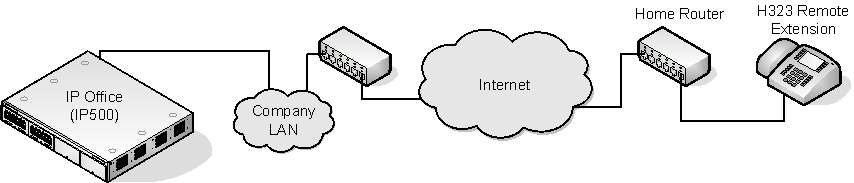
The system can be configured to support remote H.323 extensions in the case where NAT is used in the connection path. This could be the case where the IP Office is located behind a corporate NAT/Firewall router and/or the H.323 phone is located behind residential NAT enable router. The use of this option and the interaction and configuration of external third party elements is beyond the scope this help file.
When the public IP address of the corporate router is unknown, you need to configure a STUN server in the the IP Office LAN's Network Topology settings. Note however that this option is not supported if the Firewall/NAT Type is set to Symmetric Firewall or Open Internet.
Enabling the Allow Remote Extn option also makes visible the configuration of the RTP Port number Range (NAT) settings.
Supported Telephones: Currently, remote H.323 extension operation is only supported with 9600 Series phones already supported by the IP Office system.
License Requirements: By default, only 4 users can be configured for remote H.323 extension usage without needing licenses. Additional users can be configured if those additional users are licensed and configured with either Teleworker or Power User user profiles.