

AVAYA DOCUMENTATION CENTER
Find answers to your technical questions and learn how to use our products
IP Office Platform H.323 Telephone Installation
VPN Remote Phones
Avaya IP phones at remote locations can be connected to the IP Office system via IPSec VPN tunnels. This is supported for 4610SW, 4621SW, 5610SW and 5621SW phones. It is also supported for 9600 Series phones.
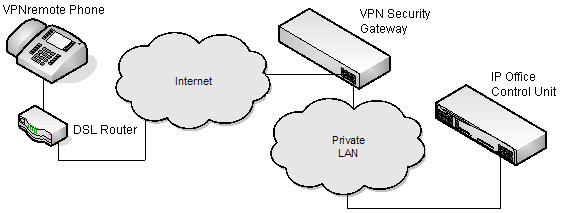
Additional components required for remote phones over VPN are:
IP Office VPNremote Phone Firmware: This firmware is included with the IP phone firmware set.
VPN Security Gateway: The IP Office system does not support all the IPSec features needed for VPNremote phones using its own IPSec tunnels. Therefore the VPN tunnel from remote phones must end at a suitable alternate VPN gateway device. The device must support one of the following methods:
Avaya Gateways: Avaya security gateway devices (SG and VSU) use an Avaya proprietary protocol called
CCD Avaya SG Series (4.6 firmware or higher)
Avaya VSU Series (3.2 firmware or higher)
Non-Avaya Gateways: Non-Avaya VPN gateways with IKE Extended Authentication (Xauth) with Pre-shared Key (PSK). Installation notes exist for the items listed below. This does not imply any recommendation of those devices by Avaya or preclude other devices.
Note:Avaya cannot guarantee support for services through non-Avaya devices.
Cisco VPN 300 Series Concentrators
Cisco PIX 500 Series Security Appliances
Juniper Networks NetScreen Series VPN Devices
Juniper Networks Secure Services Gateway 500 Series
Juniper Networks Integrated Security Gateway (ISG) Series
Kentrox Q2300 VPN Router
Sonicwall Tz170 VPN Router
Netgear FVS338 VPN Router
Netgear FVX538 VPN Router
Adtran Netvanta 3305 VPN Router