

AVAYA DOCUMENTATION CENTER
Find answers to your technical questions and learn how to use our products
IP Office Platform H.323 Telephone Installation
Example System Overview
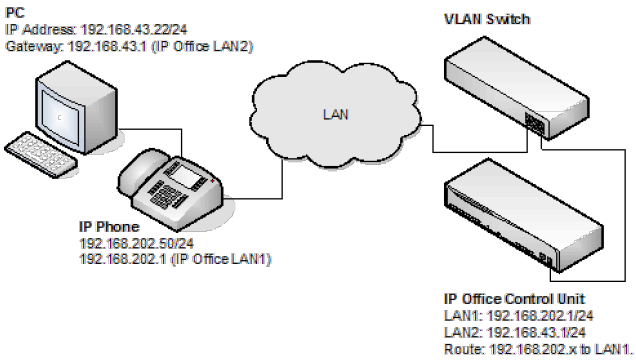
IP Office Configuration: The table below details the configuration for IP Office. Additional configuration is not required by IP Office in support of 802.1 tagging.
Option
Value
IP Address LAN1
192.168.202.1
IP Mask LAN1
255.255.255.0
IP Address LAN2
192.168.43.1
IP Mask LAN2
255.255.255.0
Router
192.168.202.1
Call Server
192.168.202.1
IP Phone- Configuration: In the example below, the IP phone was configured with fixed IP addressing.
Option
Value
IP Address
192.168.202.50
IP Mask
255.255.255.0
Router
192.168.202.1
Call Server
192.168.202.1
VLANID
100
VLAN Switch Configuration: The table below summaries the HP configuration for ports and VLANs.
Port
VLAN 100 Voice
VLAN 101 Data
3
Tagged
Untagged
5
Untagged
-
6
-
Untagged
The PC –Configuration: Shown below is the IP configuration of the PC1; no option in support of 802.1p or 802.1q is enabled on the PC.
Option
Value
IP Address
192.168.43.22
IP Mask
255.255.255.0
Router
192.168.43.1
Summary
From the port on which the PC and IP phone reside, you can receive two types of Ethernet frame (that is sent from Phone or PC):
Tagged packets are sent by IP Phone.
Untagged packets are sent by PC.
When an untagged packet is sent by the PC attached to the IP Phone port, it will be propagated only to VLAN 101. This is because when we added the port 3 to VLAN 101 the Mode option was specified as untagged. While for the other VLAN (101) the option Tagged was selected for port 3 in VLAN 101. Tagged packets will thereby go to VLAN 100 while the untagged will go to 101.
When a packet originates from an IP Phone it is tagged. Since the option 'untagged' is selected for port 5 in VLAN 100, the 802.1 tag is removed before the switch forwards the packet to this port. Similarly, when an untagged packet is originated and sent by the IP Office, the switch will tag the packet before forwarding LAN port 3.