

AVAYA DOCUMENTATION CENTER
Find answers to your technical questions and learn how to use our products
Using the Solution Deployment Manager client
Adding the ASP 130 host information into the /etc/hosts file
This section covers the procedure for adding the ASP 130 ESXi host information into the installer’s computer, laptop, or /etc/hosts file to resolve the FQDN of the host. When adding a host in SDM Client, use the FQDN as ASP 130 is an ESXi deployment. Do not use the IP Address and 192.11.13.6.
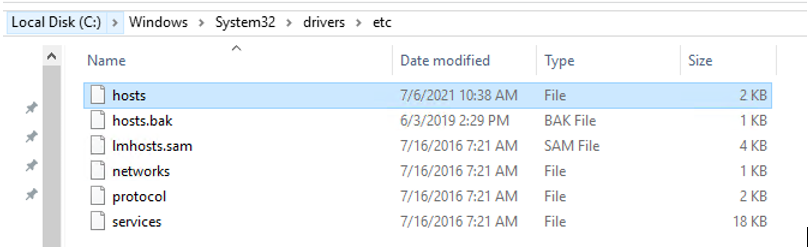
- From the computer or laptop, open a Windows Explorer window.
- Go to .
- Right-click the hosts file and select edit.
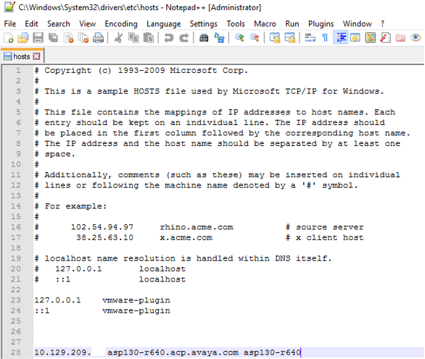
ADDITIONAL INFORMATION:A text editor of choice can be used. For example, Notepad++, notepad.
- In the hosts file, add the ESXi host IP address, FQDN, and a short host name.
ADDITIONAL INFORMATION:
- To save the changes, go to File and click Save,.