Create the SIP Media Interfaces

Last Updated : Oct 16, 2023 |

You need to define a media interface for each SIP Server to send and receive media (RTP or SRTP).

Procedure

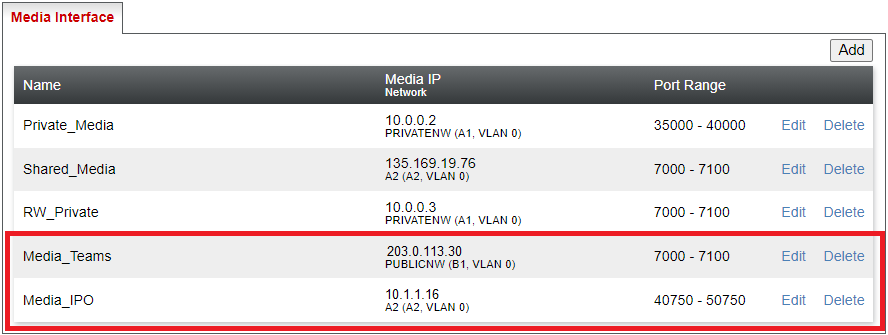
  1. Select Network & Flows and then Media Interface.
  2. Add a media interface for the IP Office:
    1. Click Add.
    2. In the Name field, enter a description name for the interface.
    3. In the IP Address field, select the ASBCE's internal network interface.
    4. Set the ports range to match the RTP port range configured on the IP Office system. The default range is 46750 to 50750.
    5. Click Finish.
  3. Add a media interface for MS Teams:
    1. Click Add.
    2. In the Name field, enter a description name for the interface.
    3. In the IP Address field, select the ASBCE's external network interface.
    4. Set the ports to match those used for SIP media with MS Teams.
    5. Click Finish.
  4. The final settings will look like the following example: