

Create the SIP Signaling Interfaces

Last Updated : Oct 16, 2023 |

You need to define a SIP signaling interface for each SIP Server.

Procedure

  1. Select Network & Flows and then Signaling Interface.
  2. Add a signaling interface for the IP Office:
    1. Click Add.
    2. In the Name field, enter a description name for the interface.
    3. In the IP Address field, select the ASBCE's internal network interface.
    4. Set the TCP Port and UDP Port values to blank. Set the TLS Port value to the port required.
    5. In the TLS Profile, select the TLS server profile previously created for the IP Office.
    6. Click Finish.
  3. Add a signaling interface for MS Teams:
    1. Click Add.
    2. In the Name field, enter a description name for the interface.
    3. In the IP Address field, select the ASBCE's external network interface.
    4. Set the TCP Port and UDP Port values to blank. Set the TLS Port to the port required.
    5. In the TLS Profile, select the TLS server profile previously created for MS Teams.
    6. Click Finish.
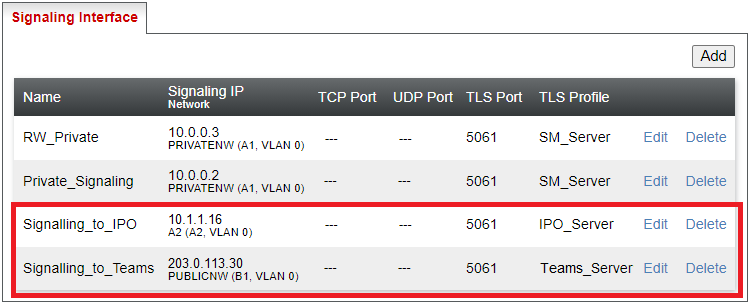
  4. The final settings will look like the following example:


Next Steps