

AVAYA DOCUMENTATION CENTER
Find answers to your technical questions and learn how to use our products
IP Office Security Guidelines
Windows Certificate Store Organization
By default, certificates are stored in the following structure:
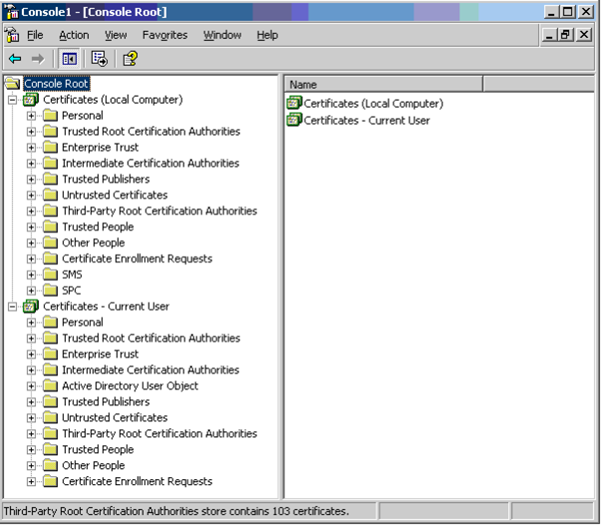
Each of the sub folders has differing usage. The Certificates - Current User area changes with the currently logged-in windows user. The Certificate (Local Computer) area does not change with the currently logged-in windows user.
IP Office Manager and other Windows applications only access some of the certificate sub folders:
Local Computer Folder |
Usage |
|---|---|
Folder searched by IP Office Manager and some Web Browsers 1st for a certificate to send to the IP Office when requested. Certificate matched by the subject name contained in . Folder accessed whenever 'Local Machine' certificate store used for Security Settings. Folder searched by IP Office Manager for matching certificate when certificate received from the system, and = Medium or High. |
|
Folder searched by IP Office Manager for matching root CA certificate when non-self-signed certificate received from IP Office, and = Medium or High. Folder searched by some browsers and other applications for matching root CA certificate when a certificate received from IP Office. |
Current User Folder |
Usage |
|---|---|
Folder searched by IP Office Manager 2nd for a certificate to send to the IP Office when requested. Certificate matched by the subject name contained in . Folder accessed whenever 'Current User' certificate store is used for Security Settings. Folder searched by IP Office Manager for matching certificate when certificate received from IP Office, and = Medium or High. |
|
Folder searched by IP Office Manager for matching parent certificates when non-self-signed certificate received from the system, and = Medium or High. This folder is not used by non-Microsoft applications such as Chrome or Safari browsers – the corresponding Local Computer folder is used. |
|
Folder searched by IP Office Manager for matching parent certificates when non-self-signed certificate received from the system, and = Medium or High. This folder is not used by non-Microsoft applications such as Chrome or Safari browsers – the corresponding Local Computer folder is used. |