

AVAYA DOCUMENTATION CENTER
Find answers to your technical questions and learn how to use our products
IP Office Security Guidelines
User Based Barring
There are several potential methods for achieving different routing/barring rules for Users.
One effective method that minimizes the per-user config, and can be part of user rights templates, centralizes the routing/barring config, and maintains features like secondary dial tone, is to create copies of the “50:Main” ARS for the different access levels required.
As 50:Main is the default it makes sense for that to be the one that is used for most users, or on sites with specific concerns about security the most restricted.
For this example we will define two alternate ARS entries for Local & Long Distance, and Unrestricted, by copying the default Main then restrict Main to be local only. All the ARS tables must route Emergency Calls.
The new Short Codes in the Main ARS will be:
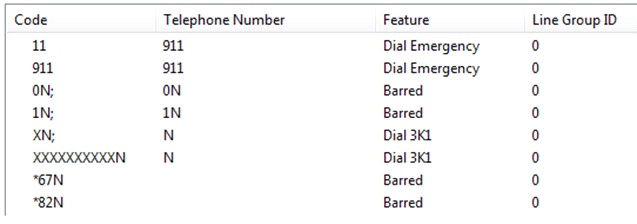
The 0N; and 1N; codes have been changed to barred and barred codes added for *67 and *82. Note the addition of the N to ensure a match for redial and so on. Short codes can be added for areas where 7 digit local dialing is still available if required, also it might be useful to create Short Codes to trap local Area Codes that have been dialed with a leading 1, also Freephone dialing.
The Local & Long Distance Short codes will be:
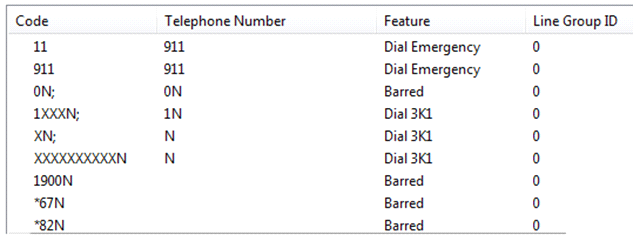
This will allow all calls starting '1' except Premium Rate (1-900 numbers), the 1N; Short Code is modified to 1XXXN; to avoid people pausing during dialing matching a simple “1N;" short code. The barring for *67 and *82 is repeated.
The Unrestricted ARS short codes will be:

This is totally unrestricted, in real operation it is unlikely that there will be totally unrestricted out-dialing.
The Default system short code for dialing is Unchanged:
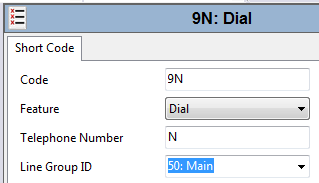
Add specific User Short Codes for users who are allowed greater dialing privileges, similar to the default system Short code but pointing to the appropriate ARS entry. This can be done via User Rights Templates.
For more information on ARS operation, see the field descriptions for the ARS tab in Administering Avaya IP Office™ Platform with Manager.