

AVAYA DOCUMENTATION CENTER
Find answers to your technical questions and learn how to use our products
Deploying IP Office as an Avaya Cloud Office ATA Gateway
Configuring incoming call routing
You need to add an incoming call route for calls from Avaya Cloud Office™.
- Load the IP Office configuration in IP Office Manager.
- From the navigation pane, select
 Incoming Call Route.
- Click the
 icon and select Incoming Call Route.
 - On the Standard tab, for the Line Group ID , manually enter the Line Number shown in the configuration for the ACO Line.
ADDITIONAL INFORMATION:
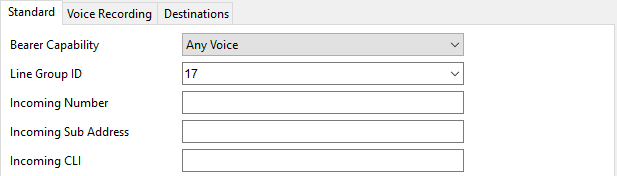
- Select the Destinations tab.
- For the Destination and Fallback Extension settings, enter . (a period or full-stop).
ADDITIONAL INFORMATION:

- Click OK.
- Click the
- Click the
 icon.
icon.
Next steps
-
Go to Checking ACO registration.