

AVAYA DOCUMENTATION CENTER
Find answers to your technical questions and learn how to use our products
Deploying IP Office as an Avaya Cloud Office ATA Gateway
Edit the system short codes
The system short codes need 2 major changes:
-
Remove all system short codes for IP Office features. Avaya do not support those features for an IP Office in IP Office ACO ATA Gateway mode.
-
Add an emergency short code(s) for emergency numbers.
-
Note: IP Office ACO ATA Gateway mode does not support user short codes.
- Load the IP Office configuration in IP Office Manager.
- From the navigation pane, select
 Short Code.
 - Delete the default system short codes:
- Use the Group Pane ().
- Select and highlight all the existing short codes.
- Right-click on the short codes and select Delete.
- Add an outgoing calls short code:
ADDITIONAL INFORMATION:
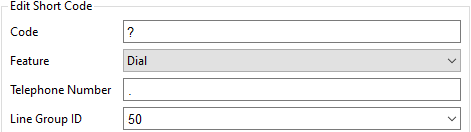
- Click the icon and select Short Code.
- Set the Code to ?
- Set the Feature to Dial.
- In the Telephone Number field, enter a . (a full-stop or period).
- Set the Line Group ID to 50.
- Click OK.
- Click OK.
- Click the
 icon.
ADDITIONAL INFORMATION:
icon.
ADDITIONAL INFORMATION:
Next steps