

AVAYA DOCUMENTATION CENTER
Find answers to your technical questions and learn how to use our products
Deploying Avaya Session Border Controller on a Hardware Platform
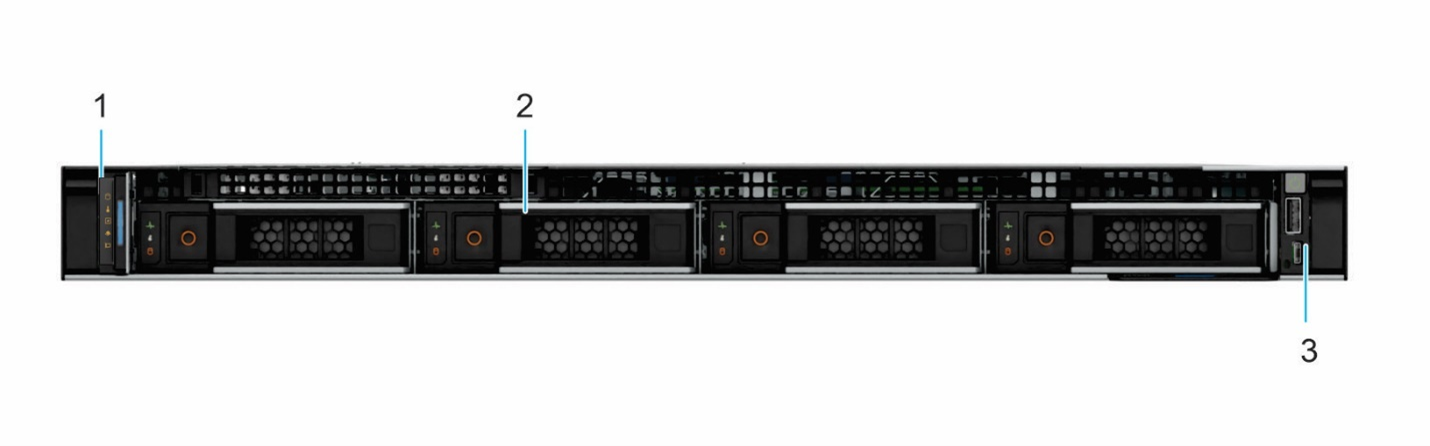
Dell 360 front view
|
Callout
|
Description
|
|---|---|
|
1
|
Left control panel displays the system health, system ID, and status LED indicator. The LCD lights blue during normal system operation. When the system needs attention, the LCD lights amber.
|
|
2
|
Hardware drive slots that contain 3.5 inch drive or 2.5 inch drive in 3.5 inch carrier adapter. These slots enable you to install drives that are supported on your system.
For information about drive slot numbers, see https://www.dell.com/support/manuals/en-in/poweredge-r360/r360_ism/system-information-label?guid=guid-ce560895-8cb4-4f71-9d8f-8b4d6e6e3ef7-enHYPHENus&lang=en-us.
|
|
3
|
Right control panel contains the Power button, USB 2.0 port and iDRAC direct Micro USB port.
|