

AVAYA DOCUMENTATION CENTER
Find answers to your technical questions and learn how to use our products
Deploying Avaya Session Border Controller on a Hardware Platform
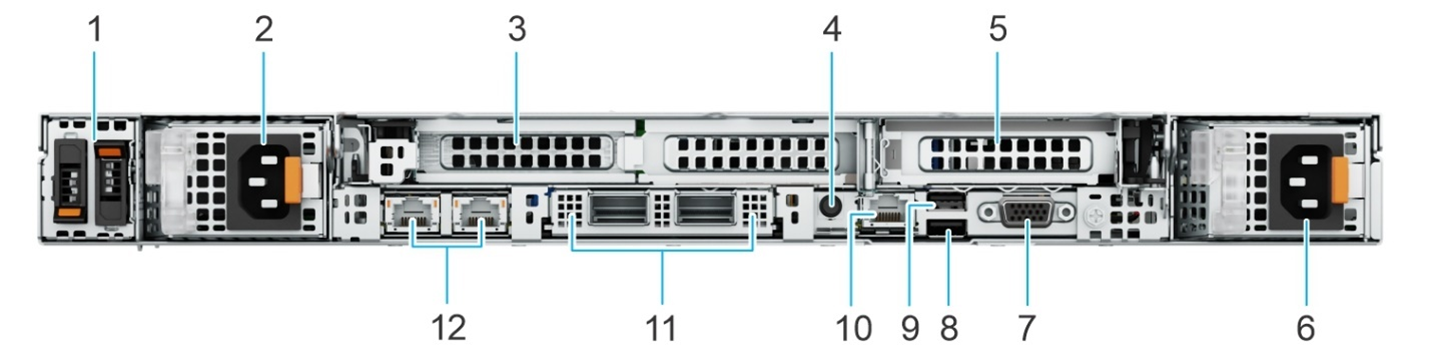
Dell R660 Avaya Solutions Platform 110 Appliance rear view
|
Callout
|
Icon
|
Description
|
|---|---|---|
|
1
|
N/A
|
The BOSS-N1 module for internal system boot.
|
|
2
|
 |
The power supply unit.
|
|
3
|
N/A
|
The PCIe expansion card riser to connect PCI Express expansion cards. For more information, see Expansion card installation guidelines.
|
|
4
|
 |
The system identification button is on the front and back enable you to locate a system within a rack. You can also use this button to reset iDRAC and to access BIOS using the step through mode. When pressed, the LED in the back panel blinks until either the front or rear button is pressed again. Press the button to toggle between on or off mode.
If the server stops responding during POST, press and hold this button for more than five seconds to enter the BIOS progress mode.
To reset the iDRAC, if not disabled in F2 iDRAC setup, press and hold this button for more than 15 seconds.
|
|
5
|
N/A
|
The PCIe expansion card riser to connect PCI Express expansion cards. For more information, see Expansion card installation guidelines.
|
|
6
|
 |
The power supply unit.
|
|
7
|
 |
The VGA port to connect a display device to the system.
|
|
8
|
 |
The USB port is 9-pin and 3.0-compliant. This port enables you to connect USB devices to the system.
|
|
9
|
 |
The USB port is 4-pin, 2.0-compliant. This port enables you to connect USB devices to the system.
|
|
10
|
 |
The dedicated iDRAC Ethernet port to remotely access iDRAC. For more information, see Integrated Dell Remote Access Controller User's Guide at PowerEdge Manuals.
|
|
11
|
N/A
|
The OCP NIC card supports OCP 3.0. The NIC ports are integrated on the OCP card which is connected to the system board.
|
|
12
|
 |
The NIC ports that are integrated on the LOM card provide network connectivity which is connected to the system board.
|