

AVAYA DOCUMENTATION CENTER
Find answers to your technical questions and learn how to use our products
Deploying Avaya Session Border Controller on a Hardware Platform
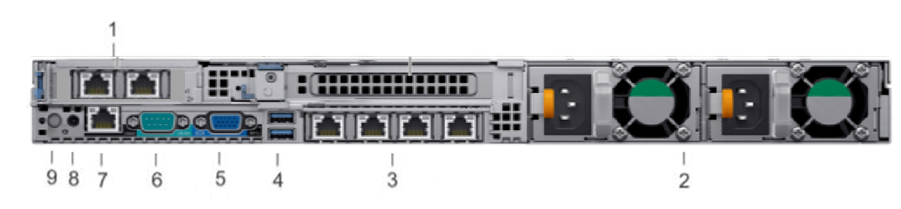
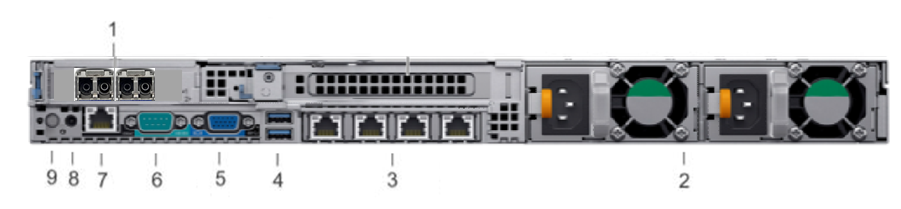
Dell R640 Avaya Solutions Platform 110 Appliance back view
Profile 3 server
Profile 5 server
|
Callout
|
Item
|
Icon
|
Description
|
|---|---|---|---|
|
1
|
NIC ports
|
N/A
|
Profile 3 has a 2-port 1GbE RJ45 NIC.
Profile 5 has a 2 port 10GbE Optical NIC.
|
|
2
|
Power supply unit (2)
|
N/A
|
Wattage and voltage type depends on configuration.
|
|
3
|
NIC ports (4)
|
 |
The NIC ports that are integrated on the network daughter card (NDC) provide network connectivity.
|
|
4
|
USB ports
|
 |
Allows you to connect USB devices to the system. These ports are USB 3.0-compliant.
|
|
5
|
VGA port
|
 |
Enables you to connect a display device to the system.
|
|
6
|
Serial port
|
 |
Serial console connections are not supported on Avaya Solutions Platform 110 Appliance server.
|
|
7
|
iDRAC9 port
|
 |
Enables you to remotely access iDRAC.
|
|
8
|
CMA power port
|
N/A
|
The Cable Management Arm (CMA) power port enables you to connect to the CMA.
|
|
9
|
System identification button
|
 |
The System Identification (ID) button is available on the front and back panel of the systems. Press the button to identify a system in a rack by turning on the system ID button. You can also use the system ID button to reset iDRAC and to access BIOS using the Step Through mode.
|