

AVAYA DOCUMENTATION CENTER
Find answers to your technical questions and learn how to use our products
Deploying Avaya Session Border Controller on a Hardware Platform
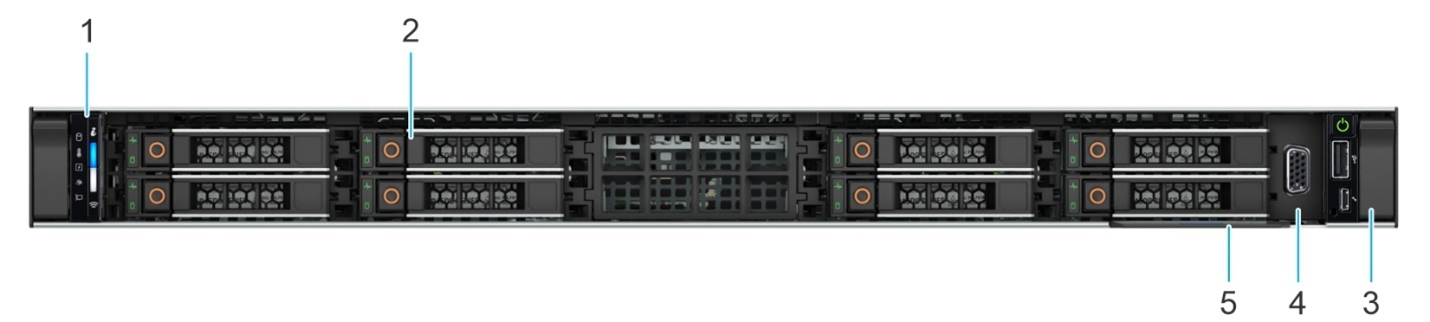
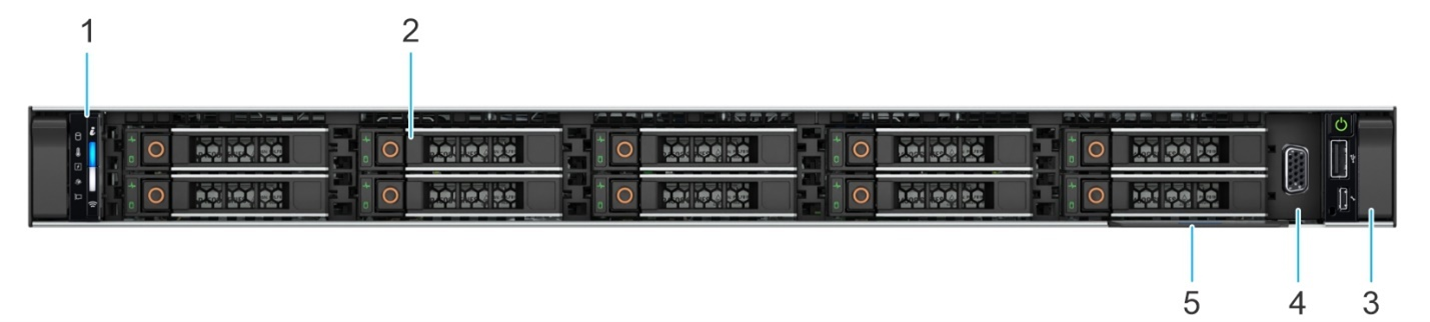
Dell R660 Avaya Solutions Platform 110 Appliance front view
|
Callout
|
Description
|
|---|---|
|
1
|
The left control panel displays the system health, system ID, status LED, and the iDRAC Quick Sync 2 wireless indicator.
|
|
2
|
The hardware drive slots that enable you to install drives that are supported on your system.
For more information about drive slot numbers, see System information labels.
|
|
3
|
The right control panel contains the power button, VGA port, USB port, iDRAC Direct (Micro-AB USB) port, and the iDRAC Direct status LED.
|
|
4
|
The VGA port that enables you to connect a display device to the system.
|
|
5
|
The Express Service Tag is a slide-out label panel that contains system information such as Service Tag, NIC, and MAC address. If you have opted for the secure default access to iDRAC, the Information tag will also contain the iDRAC secure default password.
|