

AVAYA DOCUMENTATION CENTER
Find answers to your technical questions and learn how to use our products
IP Office Voicemail Pro Example Exercises
Adding a Whisper Action
You can record a caller's name using a Voice Question action through this exercise. Then using a Whisper action, you can pass the recording directly to the Support hunt group who answers the call. The hunt group can choose to answer or reject the call.
The following is an image of a completed call flow:
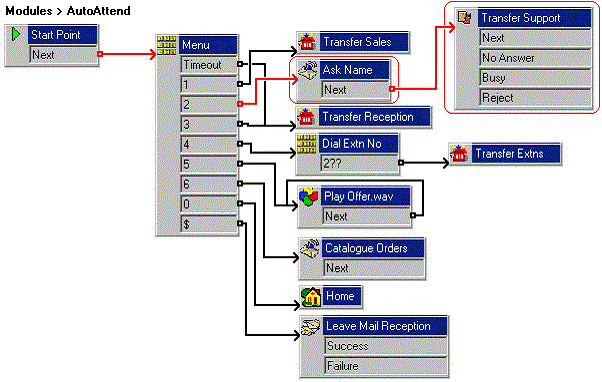
The red arrow or arrows in the call flow are the changes added in this section.
Procedure
- Do the following to delete the
 Transfer Support:
- Select the AutoAttend module.
- In the Details pane, click the Transfer Support action.
- Select Delete. The action and corresponding connection to the Menu is deleted.
- Do the following to add a new
 Voice Question:
- Click Mailbox Actions and select Voice Question.
- Click the Details pane to place the action.
- Open Properties for the new Voice Question action.
- In the General tab, change the Token Name to Ask Token.
- Follow the procedure to record the full name and company name in Adding a Voice Question Action exercise.
- In the Specific tab, click
 Add a Prompt icon. The Wave Editor window opens.
 - In Please select a file or enter a new file name, click
 Browse.
 - Select Name.wav and click Open.
- Click OK.
- In the Specific tab, click
- Do the following to add a Whisper:
- Click the
 Telephony Actions icon and select
  Whisper.
 - Click the Details pane to place the action.
- Open Properties for the new Whisper action.
- In the General tab, change the Token Name to Transfer Support.
- Click Specific, in Play recording to, type Support.
- Click OK.
- Click the
- Do the following to add connections:
- Click
 Connection.
 - Set 2 to the Ask Token action.
- Under Ask Token, set Whisper.
- Click
- Click the
 Save & Make Live icon.
 - Do the following to test the new announcement:
- To make a test call to the auto-attendant, dial *90.
- Dial 2 and record your name and company name when prompted after the tone. You are automatically transferred, the Support group.
- Extension 207 rings. Answering the call, you will hear details of the caller's name and company. Then press 1 to accept the call. To reject the call, hang up.