Getting Callers to the Campaign (Part 1)

Last Updated : Dec 24, 2021 |

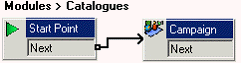
You can add a call flow to test the Catalog campaign.

The following is an image of a completed call flow:


Procedure

  1. Add a new Modules called Catalog.
  2. From Mailbox Actions, add a Campaign action and open its properties.
    1. In the Specific tab, from the Please select a campaign list, select Sales Catalog.
    2. Ensure the Leave campaign information option is selected and click OK.
  3. Connect the Start Point to the Campaign action.
  4. Click the Save & Make Live icon.
  5. In IP Office Manager, add the following short codes:
    1. In Code, enter *94.
    2. In Feature, enter Voicemail Collect.
    3. In Telephone Number, enter Catalogues.
    4. In Line Group ID, enter 0.
  6. Save and merge the configuration with the telephone system.
  7. From any extension, dial *94 and answer the questions as you are taken through the campaign.

    Repeat several times to leave several messages for the campaign.