

AVAYA DOCUMENTATION CENTER
Find answers to your technical questions and learn how to use our products
IP Office Platform H.323 Telephone Installation
Setting the Quality Alarm Levels
The system can send call quality alarms to the System Status Application. It can also send the same alarms to SNMP, emails or Syslog destinations. For details of how to configure these refer to the IP Office Manager documentation. The settings below are used to set the levels which, if exceeded, cause an alarm to be sent at the end of a call.
- Using IP Office Manager, retrieve the configuration from the system.
- Select
 System
 - Select the System Events tab and then the Configuration sub-tab.
ADDITIONAL INFORMATION:
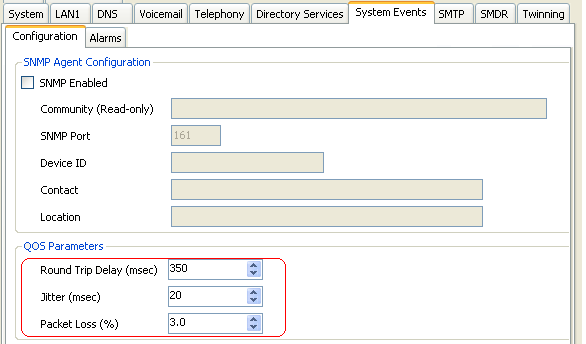 The QoS Parameters are used by the system to trigger alarms The default settings match the limits usually acceptable for good call quality
 - Save the configuration.