

AVAYA DOCUMENTATION CENTER
Find answers to your technical questions and learn how to use our products
IP Office Platform H.323 Telephone Installation
Adjusting DiffServ QoS
DiffServ is used to apply different 'quality of service' tags to the voice (RTP) and control signal (RTCP) elements of a VoIP call. The IP Office system itself does not apply any different priority to data packets its receives or sends based on their tags. However, when being used in a network where QoS is being used for prioritization by other devices, the IP Office's settings should be set to match those expected for voice calls and their associated control
signalling.
- Using IP Office Manager, retrieve the configuration from the system.
- Select
 System
 - Select the LAN1 or LAN2 tab depending on which of the system's LAN interfaces you want to use to support H.323 extensions.
- Select the VoIP sub-tab.
ADDITIONAL INFORMATION:
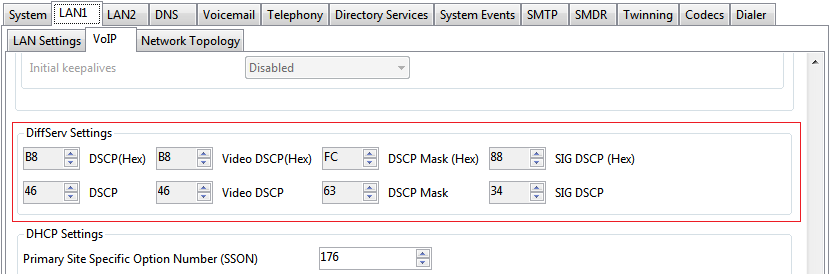 Check the DiffServ Settings that are being used by the system. Note that the two rows are linked, the upper row shows the DiffServ values in Hex numbers, the lower row shows the values in decimal. The hex values are equal to the decimal multiplied by 4. Either row can be used to set the required values.
 - Save the configuration.