

AVAYA DOCUMENTATION CENTER
Find answers to your technical questions and learn how to use our products
IP Office Platform H.323 Telephone Installation
System Default Codecs
By default, all VoIP devices added to the IP Office configuration use the system's default codec preferences. This is shown by the Codec setting on an IP trunk or extension being set to System Default.
In addition to changing the default codec preference order for all VoIP trunks and extension, the codec preferences used by a particular trunk or extension can be adjusted. However, the use of the common system settings ensures codec consistency between trunks and extensions.
- Using IP Office Manager, retrieve the configuration from the system.
- Select
 System
 - Select the VoIP sub-tab.
ADDITIONAL INFORMATION:
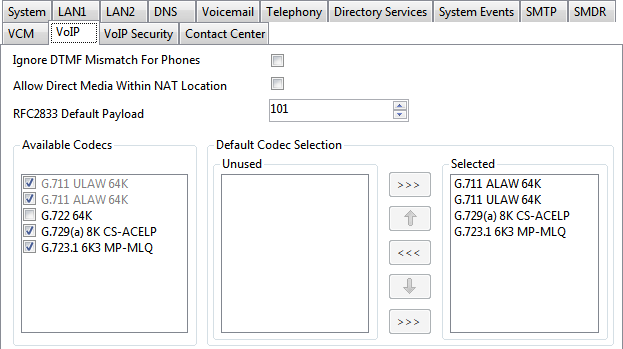 The Default Selection section is used to set the default codec preference order. This is used by all IP (H.323 and SIP) extensions and lines on the system that have their Codec Selection setting set to System Default. This is the default for all new added IP extension and lines.STEP RESULT:The Available Codecs list shows which codecs the system supports. The codecs in this list which enabled are those that can be used in other configuration forms including the adjacent default selection.Other:Deselecting a codec in this list automatically removes it from all line and extension codec lists where it was being used.
 - Save the configuration.