

AVAYA DOCUMENTATION CENTER
Find answers to your technical questions and learn how to use our products
IP Office Platform H.323 Telephone Installation
Using Auto-Creation
When installing a large number of phones, unless the configuration has been pre-built, auto-creation can be used to simplify the installation process. The auto-created users are automatically linked to the IP Auto-create user rights settings. By default that set of user rights has outgoing calls barred.
-
Auto Disablement of Auto Create: Leaving the auto-create extension and user settings enabled is strongly deprecated. For Release 9.1 and higher, the system automatically disables the settings 24-hours after they are enabled.
-
Not Supported with WebLM Licensing: The auto-create extension and user options are not useable on systems configured to acquire licenses from a WebLM service.
Before you begin
On R11.0.4.0 and higher systems, set the Default Extension Password before enabling auto-creation.
- Using IP Office Manager, retrieve the configuration from the system.
- Select
 System
 - Select the LAN1 or LAN2 tab depending on which of the system's LAN interfaces you want to use to support H.323 extensions.
- Select the VoIP sub-tab.
ADDITIONAL INFORMATION:
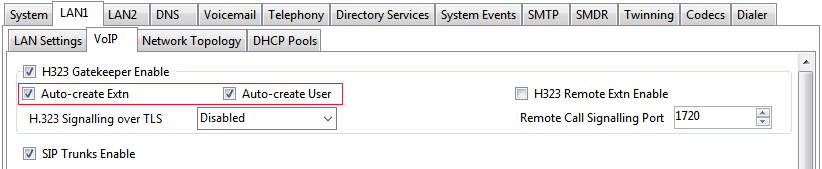
- Set the Auto-create Extn and Auto-create User settings
ADDITIONAL INFORMATION:Note:It is necessary to manually create the extension entries and or manually create the user entries before installing the phones.On pre-11.0.4.0 systems, when Auto-create Extn is selected, set and confirm a password. The password is set as the Phone Password for any extensions created using autocreation. The phone password is used for registration.
- Save the configuration.