

AVAYA DOCUMENTATION CENTER
Find answers to your technical questions and learn how to use our products
IP Office Platform H.323 Telephone Installation
Example System Overview
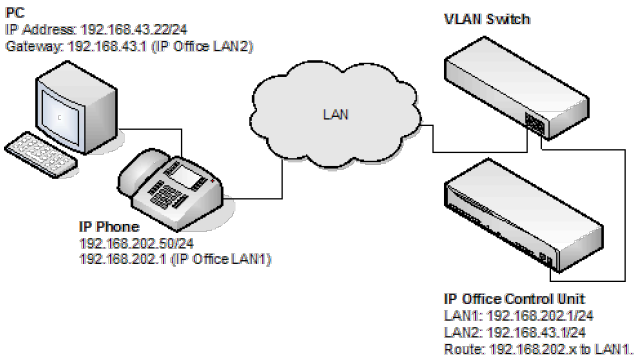
-
IP Office Configuration: The table below details the configuration for IP Office. Additional configuration is not required by IP Office in support of 802.1 tagging.OptionValueIP Address LAN1192.168.202.1IP Mask LAN1255.255.255.0IP Address LAN2192.168.43.1IP Mask LAN2255.255.255.0Router192.168.202.1Call Server192.168.202.1
-
IP Phone- Configuration: In the example below, the IP phone was configured with fixed IP addressing.OptionValueIP Address192.168.202.50IP Mask255.255.255.0Router192.168.202.1Call Server192.168.202.1VLANID100
-
VLAN Switch Configuration: The table below summaries the HP configuration for ports and VLANs.PortVLAN 100 VoiceVLAN 101 Data3TaggedUntagged5Untagged-6-Untagged
-
The PC –Configuration: Shown below is the IP configuration of the PC1; no option in support of 802.1p or 802.1q is enabled on the PC.OptionValueIP Address192.168.43.22IP Mask255.255.255.0Router192.168.43.1
Summary
From the port on which the PC and IP phone reside, you can receive two types of Ethernet frame (that is sent from Phone or PC):
-
Tagged packets are sent by IP Phone.
-
Untagged packets are sent by PC.
When an untagged packet is sent by the PC attached to the IP Phone port, it will be propagated only to VLAN 101. This is because when we added the port 3 to VLAN 101 the Mode option was specified as untagged. While for the other VLAN (101) the option Tagged was selected for port 3 in VLAN 101. Tagged packets will thereby go to VLAN 100 while the untagged will go to 101.
When a packet originates from an IP Phone it is tagged. Since the option 'untagged' is selected for port 5 in VLAN 100, the 802.1 tag is removed before the switch forwards the packet to this port. Similarly, when an untagged packet is originated and sent by the IP Office, the switch will tag the packet before forwarding LAN port 3.