

AVAYA DOCUMENTATION CENTER
Find answers to your technical questions and learn how to use our products
Administering Network Connectivity on Avaya Aura® Communication Manager
Pair-wise administration of IGAR between network regions
An IGAR column is added to the IP Network Region screen for pair-wise configuration of IGAR between network regions. If the field is set to y, the IGAR capability is enabled between the specific network region pair. If the field is set to n, the IGAR capability is disabled between the network region pair.
The following screen validations must be performed:
When IGAR Extension is not administered on page 2 of the IP Network Region screen, the user is blocked from submitting the screen. The user is blocked if any network region pair has IGAR enabled.
When IGAR is disabled using the System Parameter, the customer is warned if IGAR is enabled for any network region pair.
The system displays the following warning:WARNING: The IGAR System Parameter is disabled.
Normally, the administration between Network Region pairs can have a codec set identified for compressing voice across the IP WAN. However, if the IP WAN bandwidth is exceeded, and the IGAR field is set to y, the voice bearer is routed across an alternate trunk facility. However, under some conditions, you can force all calls to the PSTN.
The forced option can be used during initial installation to verify the alternative PSTN facility selected for a Network Region pair. This option can also be used to move traffic off the IP WAN temporarily. For example, the option is useful if an edge router is having problems, or an edge router must be replaced between a network region pair.
When the codec set type is pstn, the system uses y as the default value for the IGAR field. This default value must be used because Alternate Trunk Facility is the only means of routing the voice bearer part of the call. The other values permitted for this field are f(orced) and n(o).
When the codec set is set to pstn, the following fields are hidden:
Direct-WAN
WAN-BW Limits
Intervening Regions
When the codec set is not pstn and not blank, the system uses n as the default value for the IGAR field.
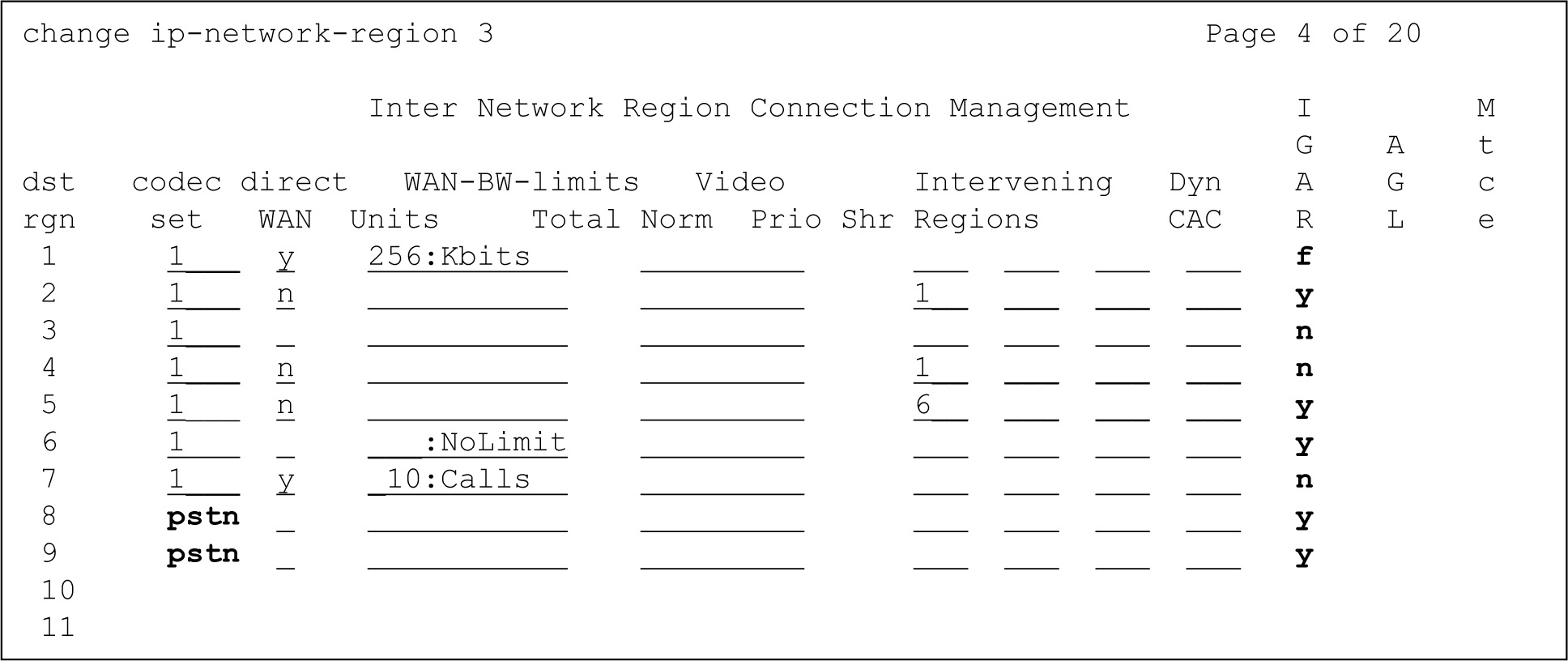
Specify codec sets for your shared network regions by putting a codec set number in the codec-set column. Specify the inter-region connections and bandwidth limits in the remaining columns.
In this example, network region 3 is connected to regions 6 and 7. Network region 3 is indirectly connected to regions 2 and 4 through region 1, and 5 through region 6.