

AVAYA DOCUMENTATION CENTER
Find answers to your technical questions and learn how to use our products
Administering Network Connectivity on Avaya Aura® Communication Manager
Dynamic generation of private/public calling party numbers
Often, a private Calling Party Number (CPN) is generated for calls within a network. However, a public CPN is required for calls that route through the main network switch to the PSTN.
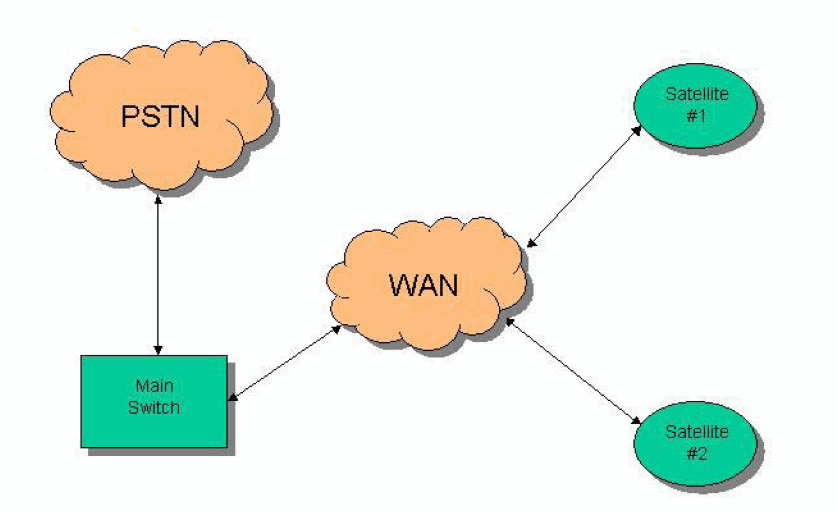
In this network, the customer wants to use internal numbering among the nodes of the network, for example, a 4-digit Uniform Dial Plan (UDP). However, when any node dials the PSTN, the call must be routed to the PSTN through the main switch.
On page 2 of the ISDN Trunk Group screen, set the Numbering Format field to private or unk-pvt. With the value unk-pvt, the number is encoded as an unknown type of number, however, the Numbering-Private Format screen is used to generate the actual number.
Note:
In this scenario, IP trunks function as ISDN trunks.
In the network example, the system only generates a private CPN if the caller dials a private level 0, 1, or 2, or unknown unk-unk number. If the caller dials a public number, the system generates a public CPN. You must fill the Numbering-Private Format and Numbering-Public/Unknown Format forms appropriately. You must then set the IP trunk groups on the two satellites to use private or unk-pvt numbering format for their CPNs.
Note:
You can designate the type of number for an outgoing call as Private level 0, 1, or 2 either on the AAR Analysis screen or the Route Pattern screen. You can designate the type of number as unk-unk or unknown only on the Route Pattern screen. If you are using UDP, then you must use the Unknown Type of Number.
The default Call Type on the AAR Analysis screen is aar. For historical reasons, aar maps to a public numbering format. Therefore, you must change the Call Type for calls within your network from aar to a private or unk-unk type of number. For a UDP environment, you must set the Numbering Format to unk-unk on the Route Pattern screen.