

AVAYA DOCUMENTATION CENTER
Find answers to your technical questions and learn how to use our products
Deploying IP Office as an Avaya Cloud Office ATA Gateway
Checking ACO registration
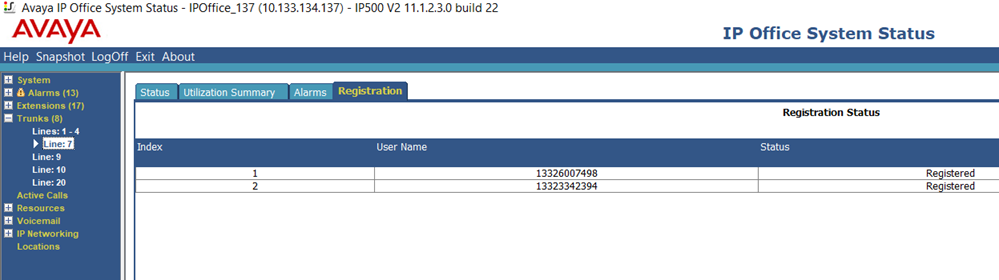
Using the System Status Application, you can view the status of the user's registrations with Avaya Cloud Office™.
Procedure
- Connect to the IP Office system using System Status Application.
- Expand the Trunks list and select the trunk number that matches the ACO line.
- Select the Registration tab. The tab displays the status of each user's registration to Avaya Cloud Office™.
- If the tab show issues for some users, check their user settings. If the tab shows issues for all users, check the ACO line settings.
Next Steps
Go to Testing operation.