

AVAYA DOCUMENTATION CENTER
Find answers to your technical questions and learn how to use our products
Deploying IP Office as an Avaya Cloud Office ATA Gateway
Running the initial IP Office configuration utility
This process runs the initial configuration menu on the IP500 V2A control unit.
Warning:
Running this process on an existing system erases the existing configuration and ends all current calls and services.
Procedure
- In the initial configuration menu:
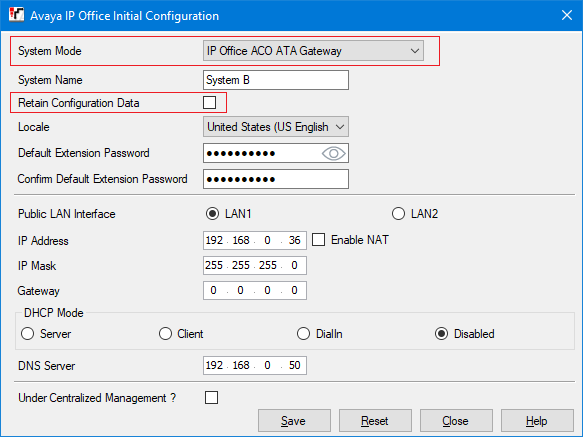
- Set the System Mode to IP Office ACO ATA Gateway.
- Deselect Retain existing configuration.
- Configure the settings to match the customer's locale and network. Note that this affects the default settings for the flash hook signal used by the system. For more details, see Adjusting the flash hook timers.
- Click Save.
- The new system configuration opens in IP Office Manager.
- From the navigation pane, select
 System.
 - Click the
 icon.
icon.
Next Steps
Go to Adding IP Office licenses.