

AVAYA DOCUMENTATION CENTER
Find answers to your technical questions and learn how to use our products
Using Avaya J100 Series SIP IP Phone for Call Center Agents
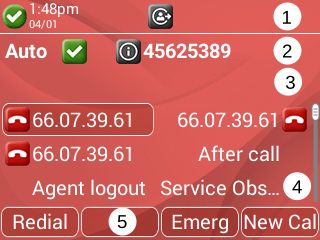
Agent phone screen
Your phone screen displays information about your phone, agent settings, and the information about incoming calls.
Depending on the phone model, the screen color and the display of icons vary. The Avaya J169 IP Phone is a grayscale display, while Avaya J179 IP Phone and Avaya J189 IP Phone is a color display.
No. |
Name |
Description |
|---|---|---|
1 |
Top bar |
Displays information such as agent id, date, and time. |
2 |
Agent status line |
Displays agent status such as work mode, call center status, and collected digits. |
3 |
Agent information line |
Displays agent information such as VuStats or QStats. |
4 |
Application line |
Displays the configured features. Use the navigation cluster to access the configured call center features. |
5 |
Soft keys |
Displays the soft keys of the available active features. |