AVAYA DOCUMENTATION CENTER
Find answers to your technical questions and learn how to use our products
Using Avaya J100 Series SIP IP Phone for Call Center Agents
Logging in to the phone
About this task
Log in to the phone as an agent to handle call center operations. To log in, your system administrator must set up your agent account.
Before you begin
Obtain your agent ID and password from the system administrator.
Procedure
- Press Main menu and scroll to Features.
- Press Select.
- Scroll to Agent Login and press Select.
- In Agent ID, type your agent ID.
- In Password, type your password.
- Press Enter.
Result
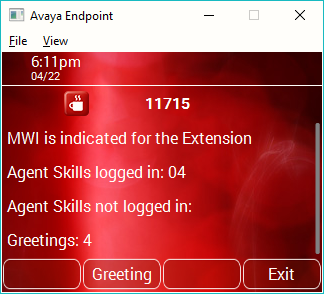
The phone displays the following information:
Whether Message Wait Indicator is configured for your Agent ID or the extension.
Your assigned and logged-on agent skills.
Agent skills that are assigned and not logged into.
Note:If the assigned Agent skills have reached the predetermined system limit, the phone does not display the details.
Recorded Agent greetings for your account.