AVAYA DOCUMENTATION CENTER
Find answers to your technical questions and learn how to use our products
Avaya Proactive Outreach Manager Overview and Specification
Advanced area code configuration (Advanced Guard Time)
POM provides an advanced area code configuration using which you can add more granular rules related to guard time configuration. You can import the area code mapping data from a CSV file. POM takes a backup of existing data before starting the import process. You can use the lock and unlock options in POM to avoid overwriting the existing area code mapping data with new mappings, which you import from a .csv file.
You can also map an area code to state and provide state level guard time configuration. You can define guard times for time zone and for state independently.
POM uses the following phone type of attributes of a record to determine the guard time of each phone attribute:
-
Phone Country Code
-
<Phone attribute name>Time zone
-
Phone State
Based on the values of the preceding attributes and the country-specific guard times configured in POM, POM derives a guard time for each phone attribute in the following order:
-
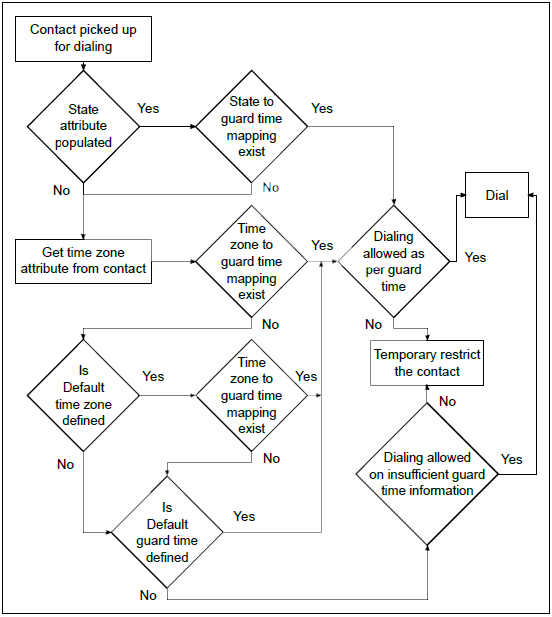
POM derives a guard time based on the Phone Country Code and Phone State attributes.For example, if:
-
Value in the Phone Country Code attribute is 1.
-
Value in the Phone State attribute is New York.
Then, POM uses the guard time configured for the New York state with country code 1 as the guard time for the phone attribute. -
-
If no guard time is configured for the Phone State, POM derives a guard time based on the Phone Country Code and <Phone attribute name>Time Zone attributes.For example, if:
-
Value in the Phone Country Code attribute is 1.
-
Value in the <Phone attribute name>Time Zone attribute is PST.
Then, POM uses the guard time configured for the PST time zone with country code 1 as the guard time for the phone attribute. -
-
If no guard time is configured for the Phone State or <Phone attribute name>Timezone, POM uses the configured Default Time Zone of the country as the guard time for the phone attribute.
-
If no guard time is defined for the Phone State or <Phone attribute name>Time Zone and no default time zone is configured for the country, POM uses the configured Default Guard Time of the country as the guard time for the phone attribute.
Similarly, POM derives a guard time for each phone attribute of a record.
For more information about area code, time zone, and guard time configurations, see Administering Avaya Proactive Outreach Manager.
POM uses the following rule of thumb to determine the time zone for a phone number:
|
Time zone
|
Mapping
|
Result
|
|
|---|---|---|---|
|
No area code defined for the country.
|
NA
|
POM uses the time zone of the country.
|
|
|
No time zone defined for the country
|
NA
|
POM uses the time zone of the zone in which the contact is imported as defined on the AEP Zones configuration.
|
|
|
One or multiple time zones defined for the country
|
The phone number matches with any one of the time zone and the area code mapping
|
POM uses the matched time zone.
|
|
The following diagram depicts the advanced area code configuration process flow: